
Oil & Gas Field Monitoring
The Oil & Gas Field Monitoring solution pack connects wellhead gateways, flow meters, pressure sensors, gas detectors, storage tank sensors, separator controllers, and pump controllers to a single production monitoring platform. Built for upstream operators who need continuous wellhead telemetry, immediate H2S and pressure safety alerts, and automated production and compliance reports, without custom integration work.
Overview
The pack monitors a wellhead production site from field sensors through to the dashboards operators use every day.
Readings from seven field devices (wellhead gateway, flow meter, wellhead pressure sensor, gas detector, oil storage tank sensor, separator controller, and transfer pump controller) arrive in the Raw Telemetry Channel. A data processing rule validates each record before passing clean data to the Processed Data Channel. Five detection rules run continuously from there: catching high wellhead and casing pressure, H2S and LEL gas hazards, low oil flow, rising water cut, and tank overfill events. When thresholds are crossed, alarms fire immediately and email notifications go to configured recipients. A Commands Channel carries pump and separator control commands sent from the dashboards.
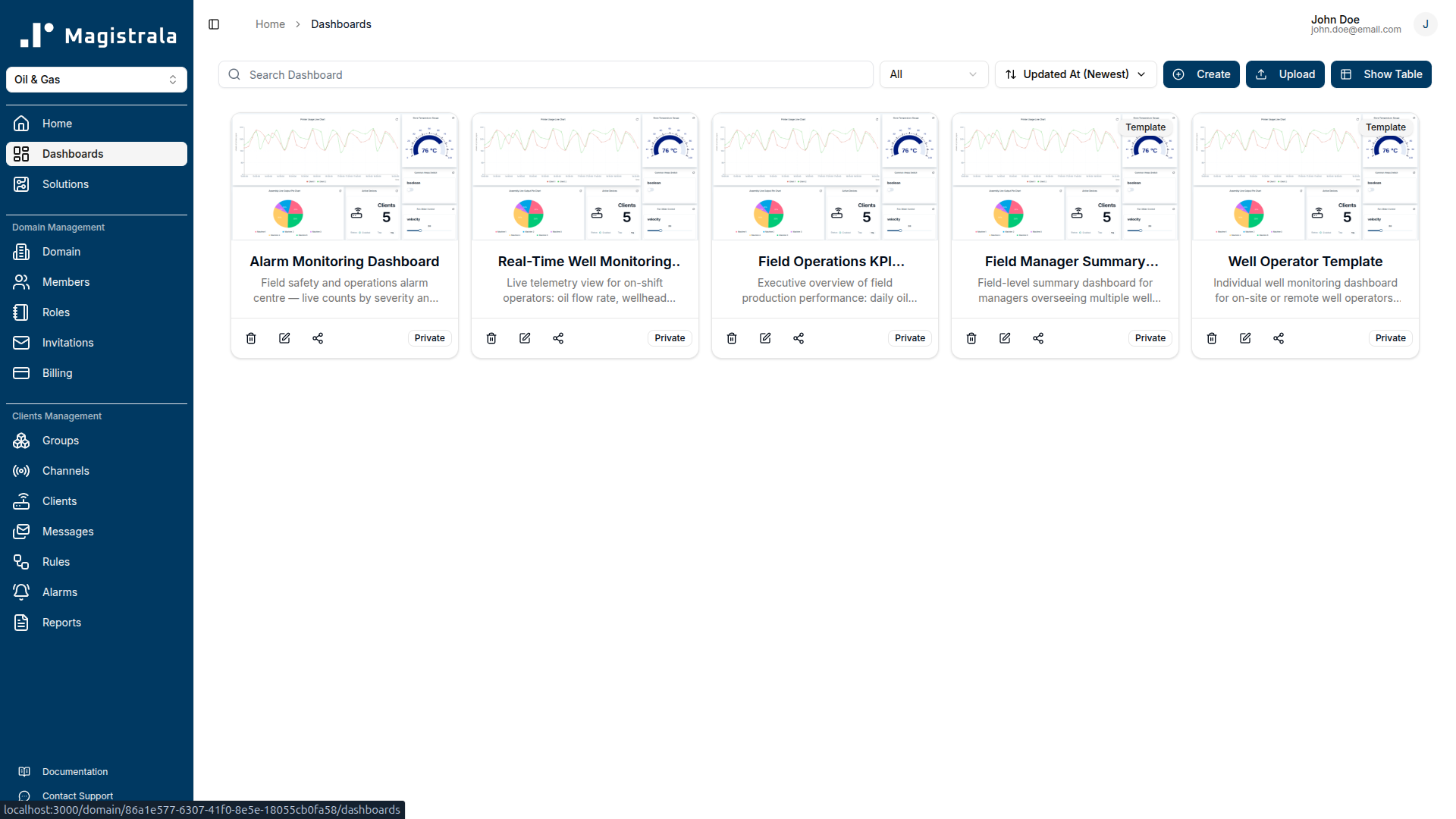
Three pre-built dashboards serve domain admins: a Field Operations KPI Dashboard for the top-level view, a Real-Time Well Monitoring Dashboard for on-shift situational awareness, and an Alarm Monitoring Dashboard for triage. Two templates, Well Operator and Field Manager Summary, use tag-based device references so the same definition scales to multiple wells without configuration changes.
Key Features
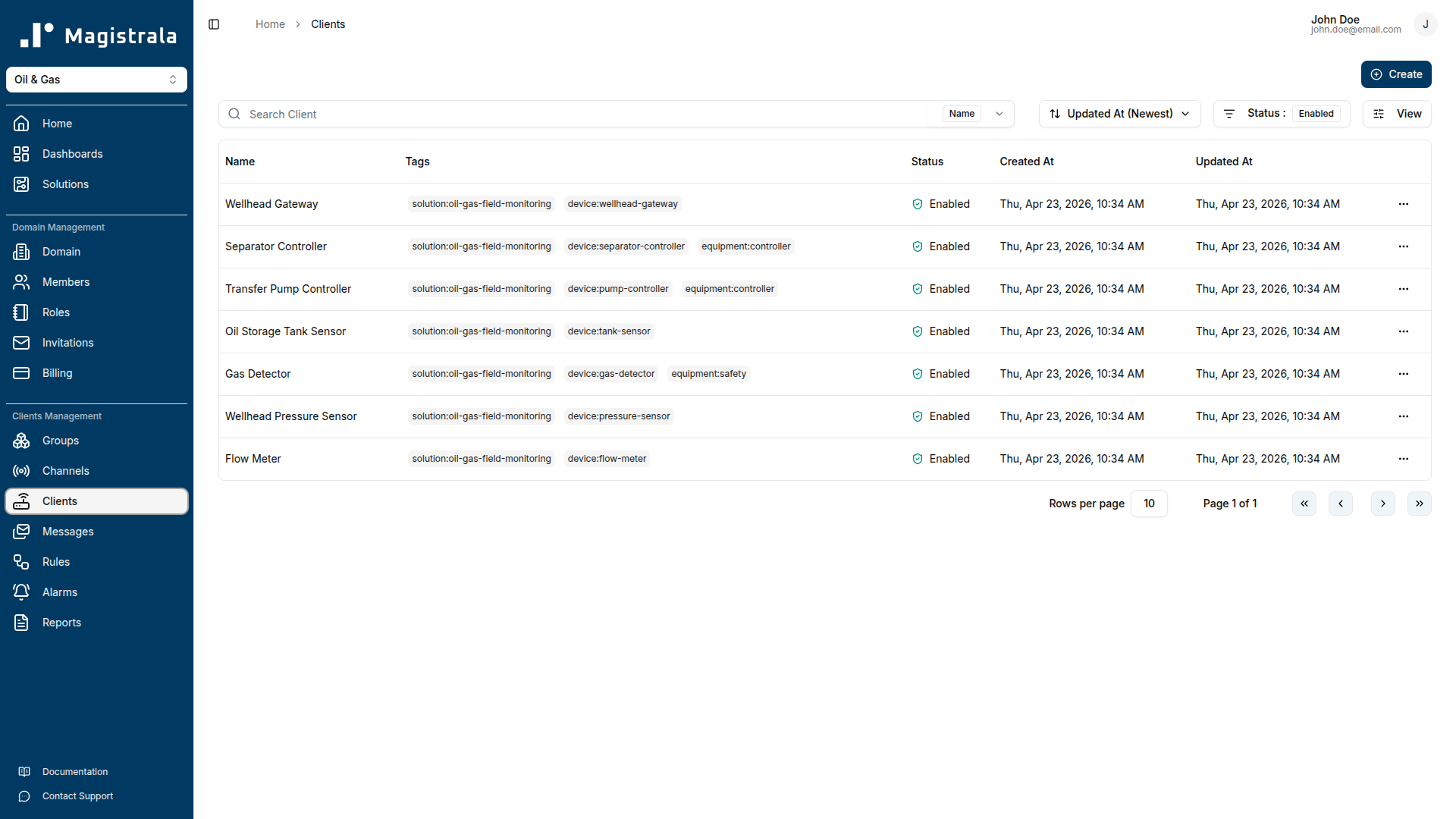
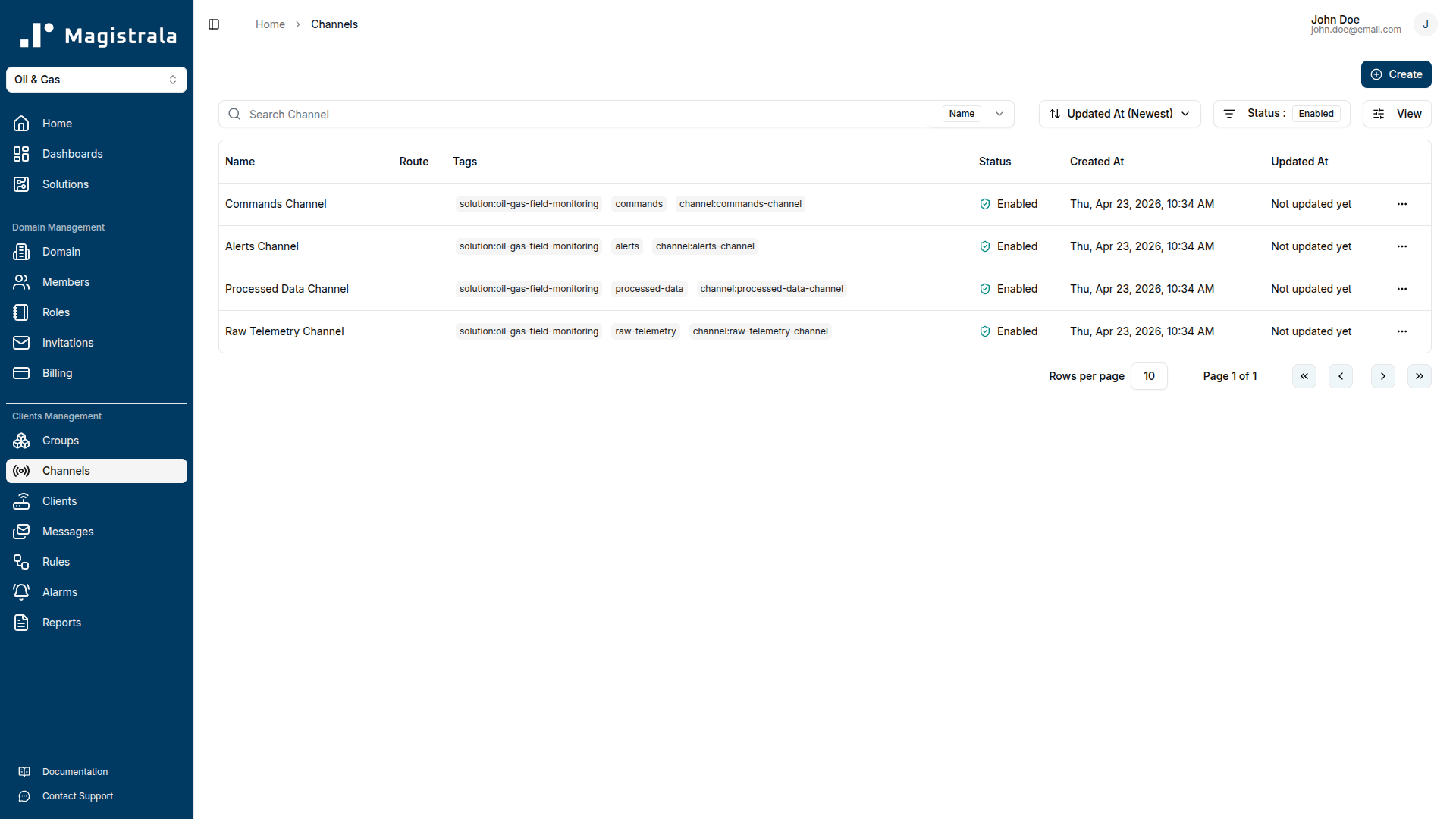
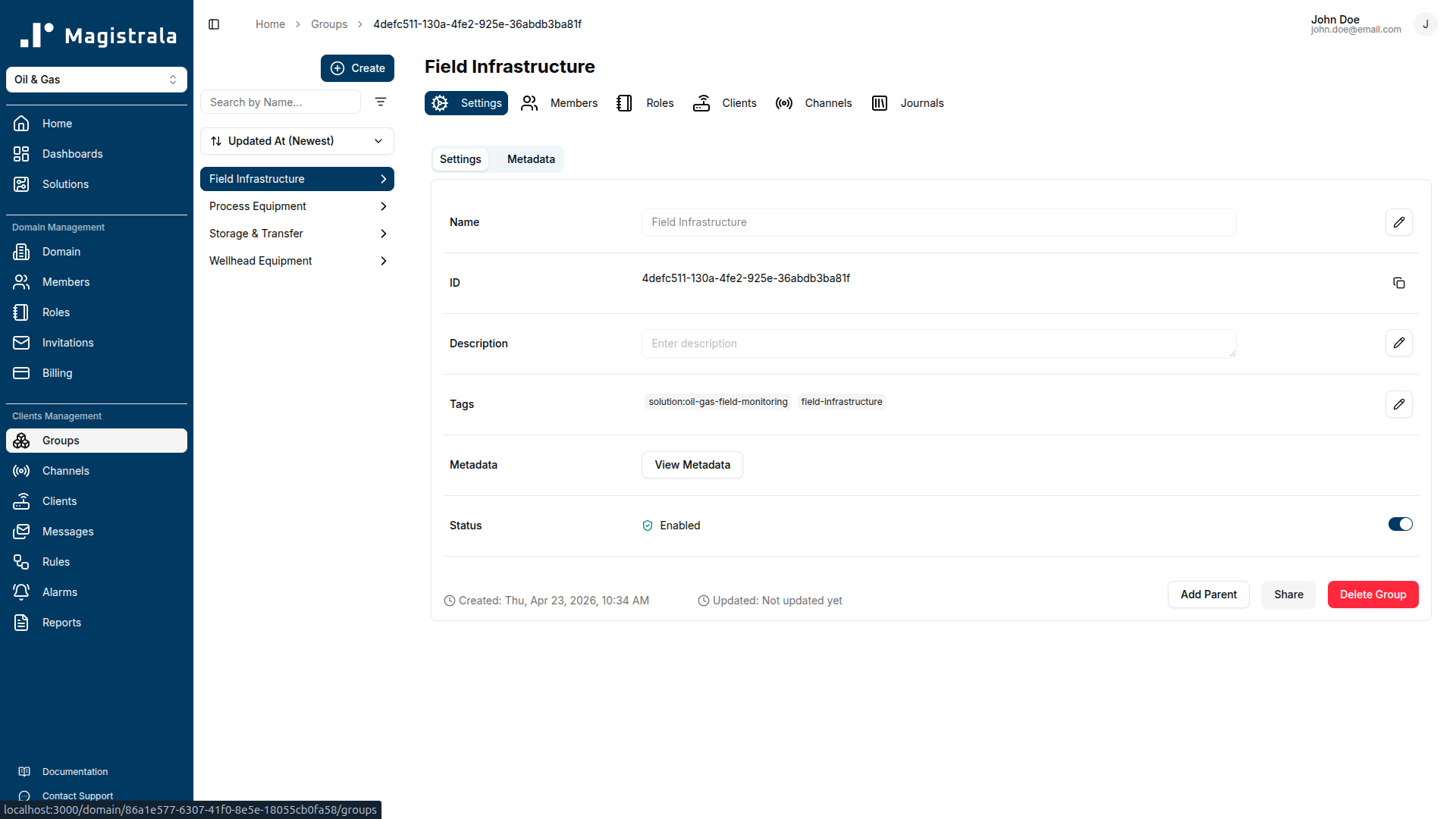
End-to-end wellhead telemetry pipeline. The pack provisions seven device clients, four channels (Raw Telemetry, Processed Data, Alerts, Commands), and four groups for access control (Wellhead Equipment, Storage & Transfer, Process Equipment, Field Infrastructure). Every SenML record arriving in the Raw Telemetry Channel is processed immediately by detection rules, so alarm latency equals the device's publish interval.
Tiered wellhead and casing pressure detection. The High Pressure Alert rule monitors wellhead_pressure and casing_pressure continuously. A Warning alarm (Severity 3) fires when wellhead pressure reaches 1800 psi; a Critical alarm (Severity 5) fires at 2200 psi. Casing pressure above 1700 psi triggers a separate Warning alarm for annulus integrity concerns. All thresholds are configurable to match the well's specific Maximum Allowable Operating Pressure (MAOP).
OSHA-aligned H2S and LEL gas detection. The Gas Leak Detection rule enforces two hazard tiers for each gas type. H2S above 5 ppm (ACGIH TLV-C ceiling) triggers a Warning alarm; H2S above 10 ppm (OSHA PEL ceiling) triggers a Critical alarm requiring immediate evacuation. LEL above 10% triggers a Warning; above 20% (the standard ignition-source elimination threshold) triggers a Critical alarm.
Well flow anomaly and water cut detection. The Well Flow Anomaly rule covers two production health indicators. It raises a Warning alarm when flow_rate drops below 50 bbl/d while pump_status is 1, catching low-production conditions caused by pump wear, sand bridging, blocked flowlines, or reservoir decline. It also monitors water_cut, raising a Warning at 40% and a Critical alarm at 80% to flag approaching water breakthrough.
Tank overfill protection. The Tank Overfill Protection rule monitors tank_level continuously. A Warning alarm (Severity 3) fires at 85% capacity, giving trucking schedulers a lead-time window. A Critical alarm (Severity 5) fires at 95%, the point where immediate action is required to prevent a spill event.
Device health monitoring. The Device Health Monitor evaluates the timestamp of incoming records hourly. Any device whose last message is more than 600 seconds (10 minutes) behind server time raises a Warning alarm, flagging connectivity or hardware failures before they create gaps in regulatory records. For safety-critical devices such as the gas detector and pressure sensor, the alarm description recommends dispatching a field inspection.
Role-differentiated dashboards and templates. Three dashboards serve domain admins. Two templates use tag-based device references (device:flow-meter, device:pressure-sensor, device:gas-detector, device:tank-sensor) so a single definition applies to any wellhead when assigned to a group containing devices with those tags.
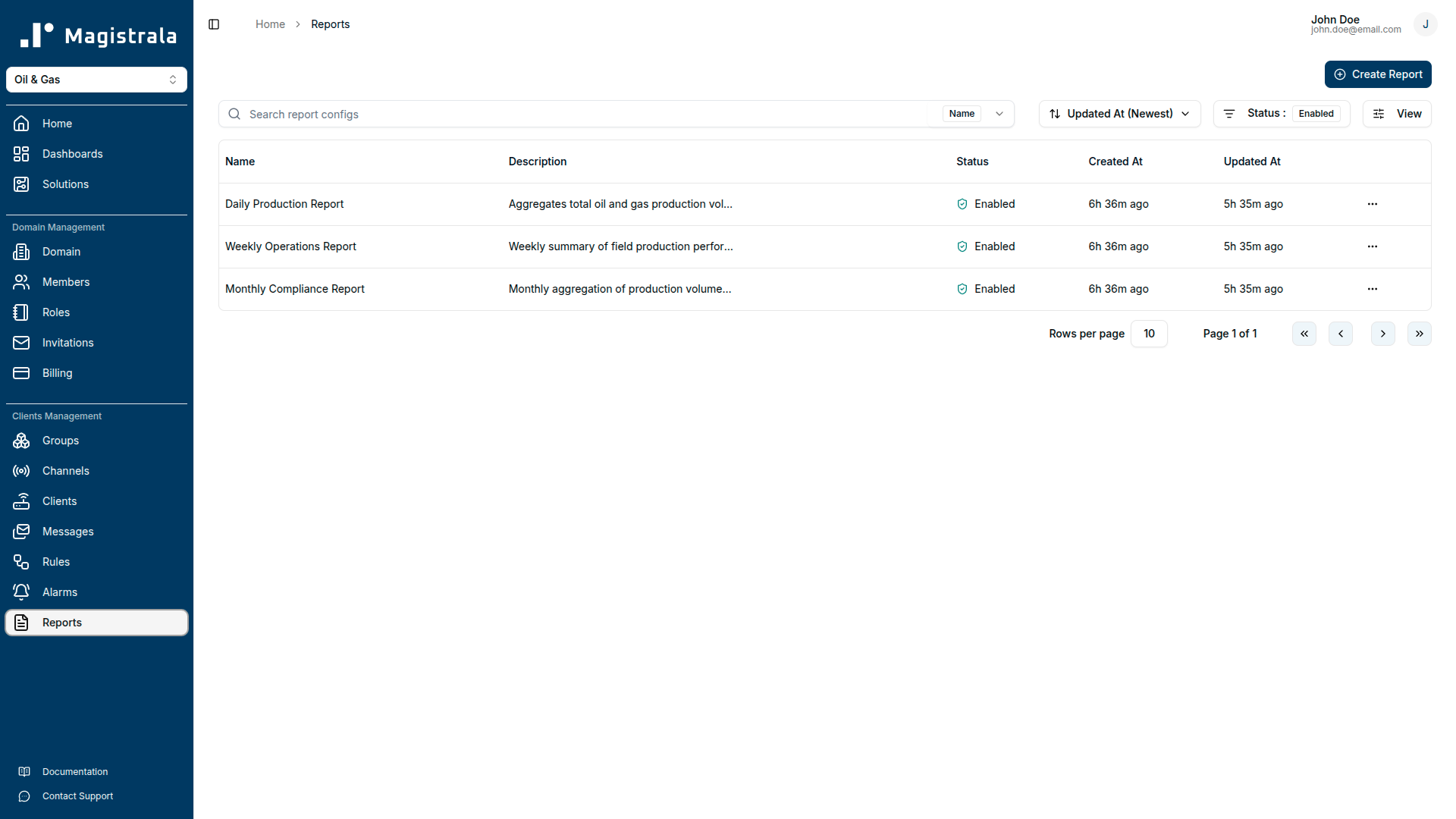
Automated reporting. Three report schedules run automatically: a daily production report, a weekly operations summary, and a monthly compliance report for regulatory submission, each delivering by email on the configured schedule.
Long-term data archival. The Data Archival rule writes production metrics from the Processed Data Channel to an external PostgreSQL database for regulatory reporting and production accounting.
Getting Started
Prerequisites
Before deploying the solution pack, confirm the following:
- A Magistrala domain is provisioned and you have administrator credentials.
- At least one compatible field device is available: a flow meter reporting flow rate and gas flow, a wellhead pressure transducer, a fixed-head gas detection unit for H2S and LEL, a tank level transmitter, a separator controller, or a pump controller with pump status output.
- Your device or gateway supports MQTT, HTTP, CoAP, or WebSocket and can publish JSON-encoded SenML payloads.
- If you plan to use the Data Archival rule, a PostgreSQL instance is reachable from the Magistrala deployment and the connection string is available.
- If you want email delivery for alarms and reports, SMTP credentials are configured in platform settings.
Connecting Your Device
Step 1 — Provision credentials from the platform.
After deploying the solution pack, navigate to your domain's Clients section. Each device (Flow Meter, Wellhead Pressure Sensor, Gas Detector, etc.) has its own client_id and client_secret. Note the channel ID of the Raw Telemetry Channel from the Channels section.
Step 2 — Configure your device or gateway.
Set these connection parameters on the device or its gateway:
| Parameter | Value |
|---|---|
| Broker | <your-magistrala-domain> |
| Port | 1883 (plain) or 8883 (TLS) |
| Topic | channels/<channel_id>/messages |
| Username | <client_id> |
| Password | <client_secret> |
Use TLS (port 8883) in production. Plain MQTT is suitable for local development only. In a typical wellhead deployment, all sensors publish through the Wellhead Gateway using the gateway's credentials; each sensor type can also be given its own client credentials for per-device access control.
Step 3 — Publish your first SenML payload.
Send a JSON array to the topic. Each object is one SenML record. Include a base time (bt) field as a Unix epoch timestamp.
[
  { "bt": 1750000000, "n": "flow_rate", "u": "bbl/d", "v": 245.5 },
  { "bt": 1750000000, "n": "gas_flow", "u": "Mcf/d", "v": 180.2 },
  { "bt": 1750000000, "n": "water_cut", "u": "%", "v": 12.5 },
  { "bt": 1750000000, "n": "wellhead_pressure", "u": "psi", "v": 1450.0 },
  { "bt": 1750000000, "n": "casing_pressure", "u": "psi", "v": 1380.0 },
  { "bt": 1750000000, "n": "h2s_concentration", "u": "ppm", "v": 2.1 },
  { "bt": 1750000000, "n": "lel_percent", "u": "%", "v": 3.5 },
  { "bt": 1750000000, "n": "tank_level", "u": "%", "v": 67.0 },
  { "bt": 1750000000, "n": "separator_temp", "u": "Cel", "v": 85.0 },
  { "bt": 1750000000, "n": "separator_pressure", "u": "psi", "v": 125.0 },
  { "bt": 1750000000, "n": "pump_status", "u": "1", "v": 1 }
]
After publishing, check the Raw Telemetry Channel's message log in the platform UI to confirm the payload arrived. Clean records will appear in the Processed Data Channel once the Data Processing rule processes them.
Supported Protocols
| Protocol | Port | Notes |
|---|---|---|
| MQTT | 1883 | Plain TCP. Development and LAN use only. |
| MQTT (TLS) | 8883 | Recommended for all production wellsite connections. |
| HTTP | 80 | POST to http://<domain>/http/channels/<channel_id>/messages. |
| HTTPS | 443 | Recommended for HTTP-based gateways. |
| CoAP | 5683 | UDP. Constrained edge devices with limited connectivity. |
| CoAP (DTLS) | 5684 | Datagram TLS for constrained devices in untrusted networks. |
| WebSocket | 8080 | Browser-based or streaming integrations. |
| WebSocket (TLS) | 8443 | Secure WebSocket. |
Dashboard Guide
Field Operations KPI Dashboard
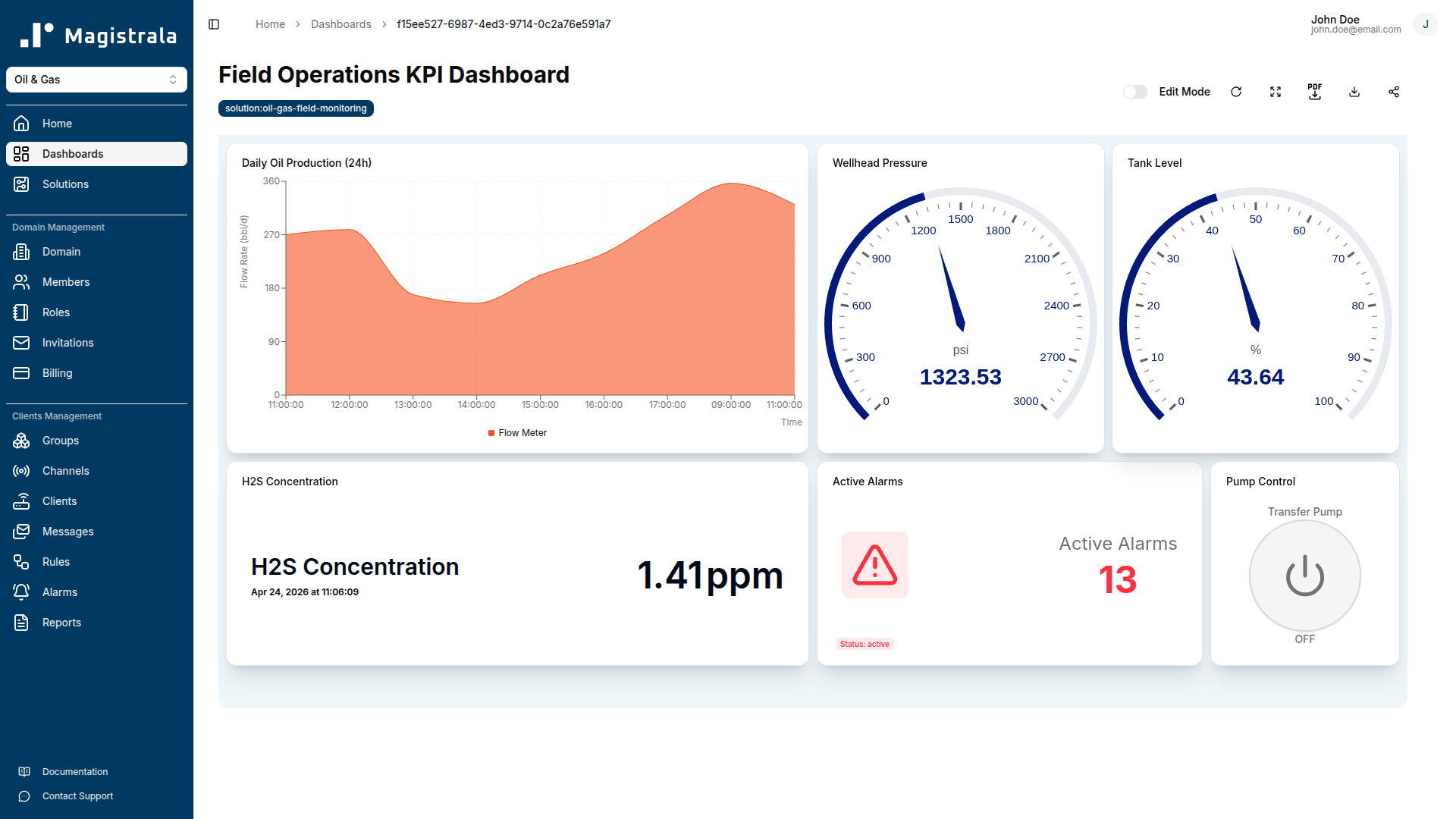
The KPI Dashboard gives field supervisors and production engineers a snapshot of wellhead performance without requiring knowledge of individual device readings.
Daily Oil Production is an area chart of flow_rate over a 24-hour rolling window, showing the day's total oil output and making sustained flow rate declines immediately visible.
Wellhead Pressure is a live gauge displaying the current wellhead_pressure reading. The warning zone begins at 1800 psi and the critical zone at 2200 psi, making pressure excursions visible at a glance.
Active Alarm Count is an alarm count card showing the total number of open alarms across all severity levels. A non-zero count means there is an open incident requiring attention.
Tank Level is a gauge showing current tank_level as a percentage of capacity, with the 85% warning level and 95% critical level visually marked.
H2S Concentration is a value card showing the most recent h2s_concentration reading in ppm, giving at-a-glance confirmation that gas levels are within safe limits.
Pump Control is a switch widget that lets operators toggle the transfer pump on or off from the dashboard. It sends commands to the Transfer Pump Controller client on the Commands Channel.
Real-Time Well Monitoring Dashboard
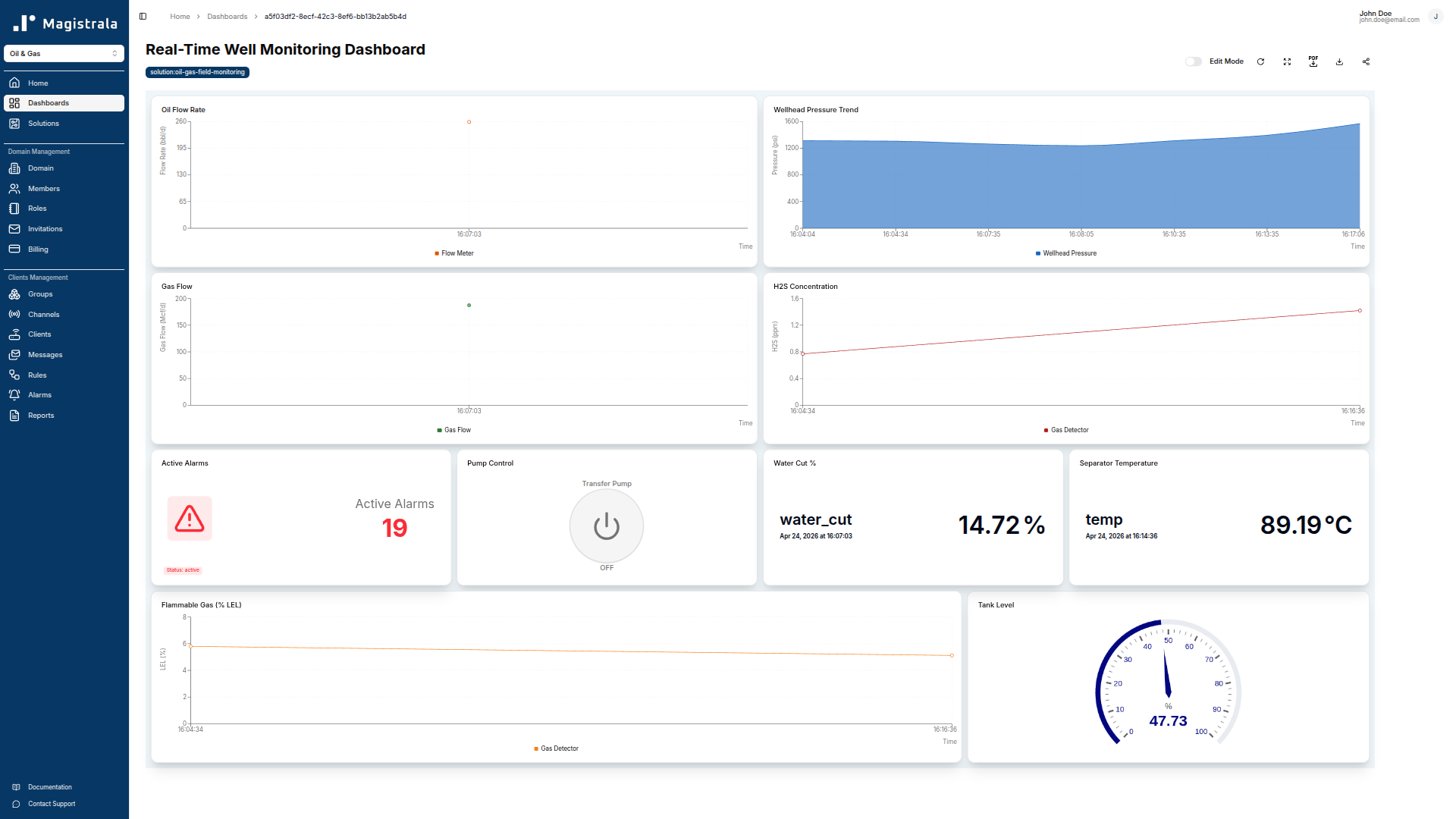
The Real-Time Well Monitoring Dashboard is the on-shift operator view, updating every 60 seconds with live telemetry from all wellhead devices.
Oil Flow Rate is a live line chart of flow_rate. Operators use it to watch for sustained declines that precede a flow anomaly alarm.
Wellhead Pressure Trend is an area chart of wellhead_pressure over the past hour. Trending pressure is easier to identify on a time-series chart than a live gauge alone.
Gas Flow is an area chart of gas_flow over the past hour. Gas-oil ratio trends here can indicate wellbore condition changes before they appear in production figures.
H2S Concentration is a line chart of h2s_concentration. A sustained climb above baseline is visible before it reaches the 5 ppm warning threshold.
Tank Level is a gauge showing current fill level.
Pump Control is a switch widget for the transfer pump, available directly from the monitoring view.
Water Cut is a value card showing current water_cut percentage. A figure climbing toward 40% warrants investigation before the water cut warning alarm fires.
Separator Temperature is a value card showing current separator_temp. Deviation from the normal operating range (~80-95°C) indicates a separator process upset.
LEL Percentage is a line chart of lel_percent. Trends above the 5% baseline are visible before the 10% warning threshold.
Active Alarms is an alarm count card giving operators a live count of open incidents without navigating away.
Alarm Monitoring Dashboard
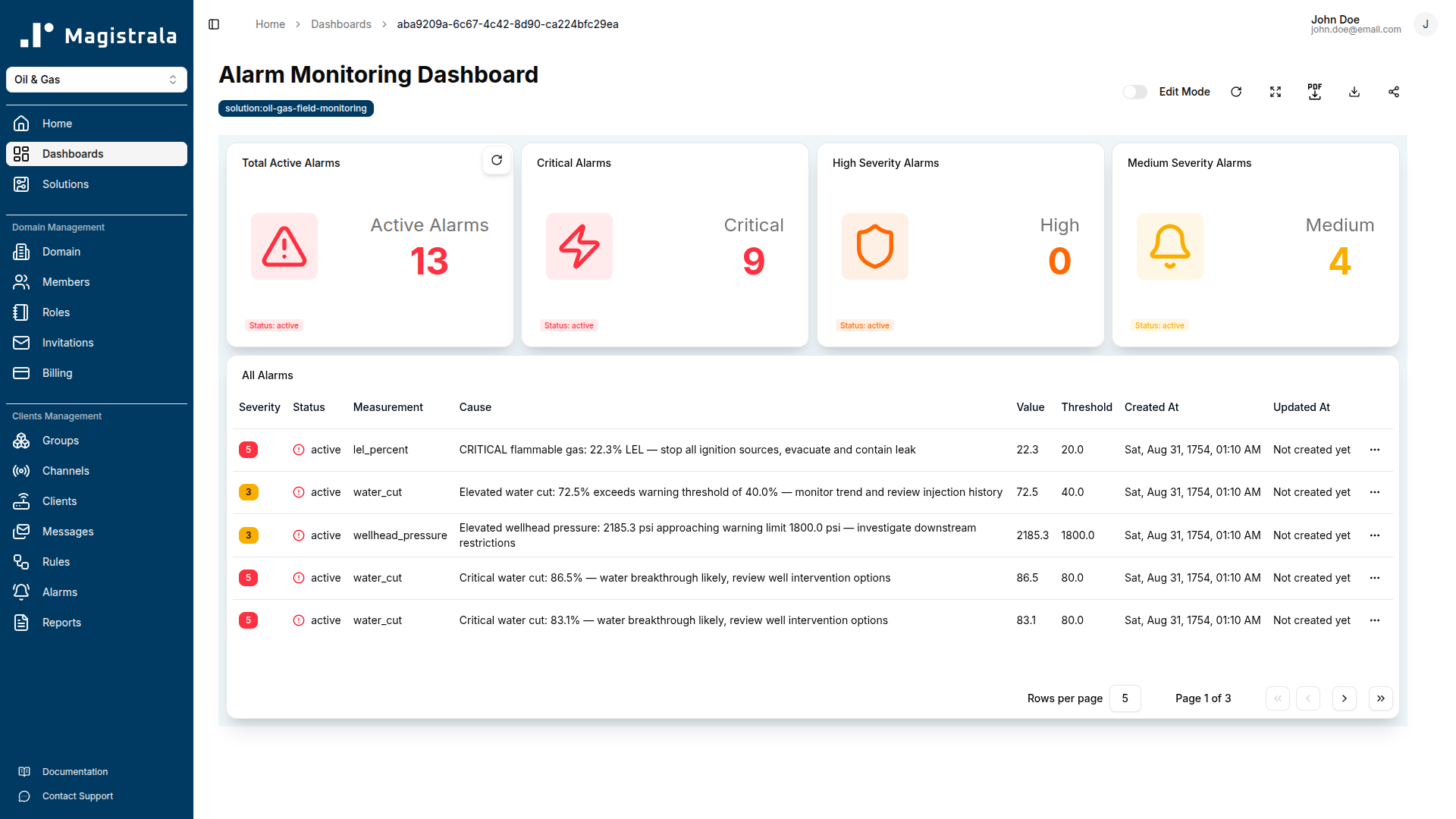
The Alarm Monitoring Dashboard is the triage centre for open alarms, giving control room staff a unified view of the current alarm state.
Total Active Alarms shows the number of open alarms across all severity levels.
Critical Alarms is filtered to Severity 5 alarms: wellhead pressure above 2200 psi, H2S above 10 ppm, LEL above 20%, water cut above 80%, and tank above 95%.
High Severity Alarms is filtered to Severity 4.
Medium Severity Alarms is filtered to Severity 3, covering the warning-level conditions for pressure, gas detection, flow anomaly, water cut, and device offline.
All Alarms is a full alarm table showing every open alarm with severity, status, measurement, cause, value, threshold, created timestamp, and last updated timestamp.
Well Operator Template
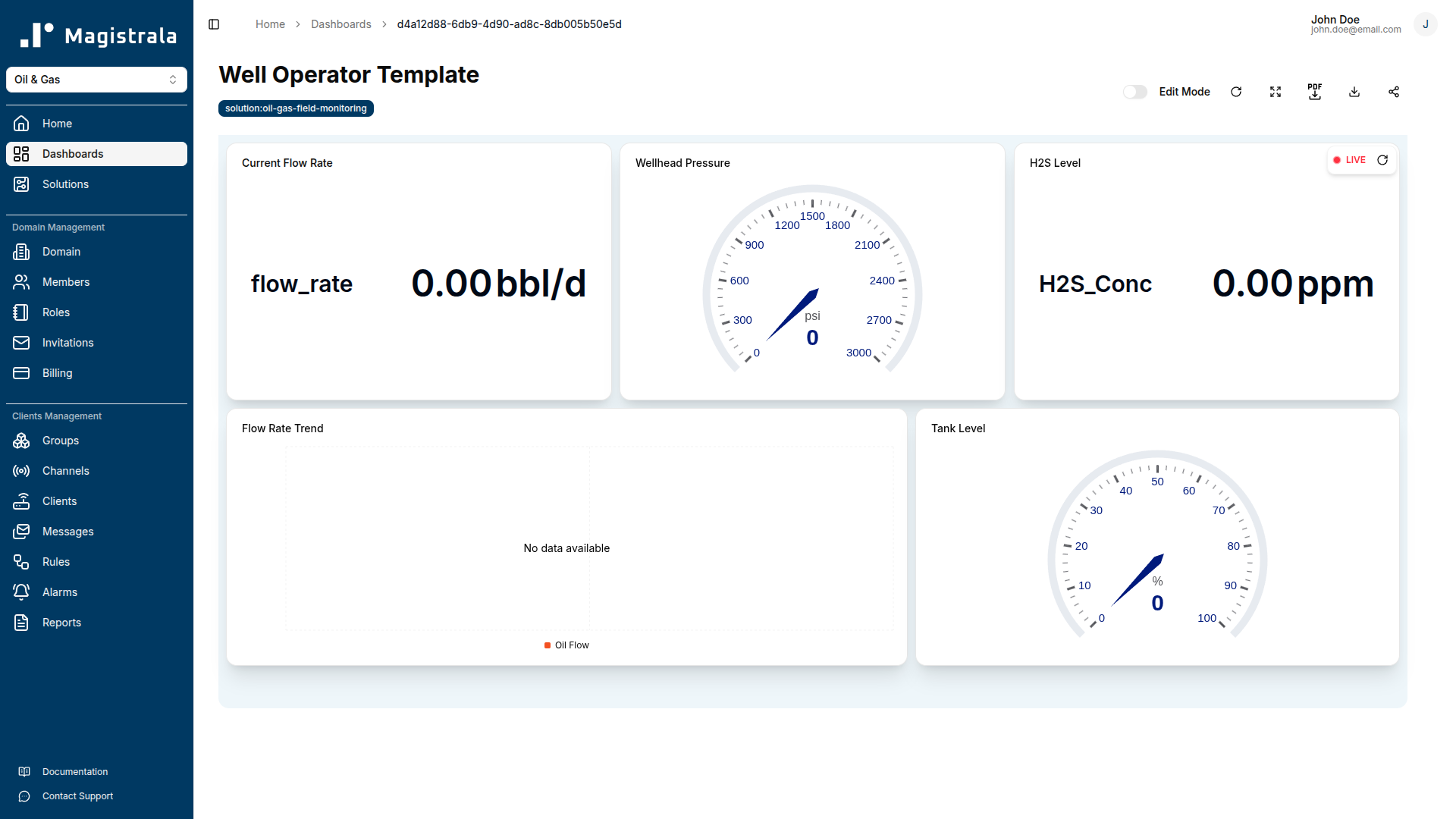
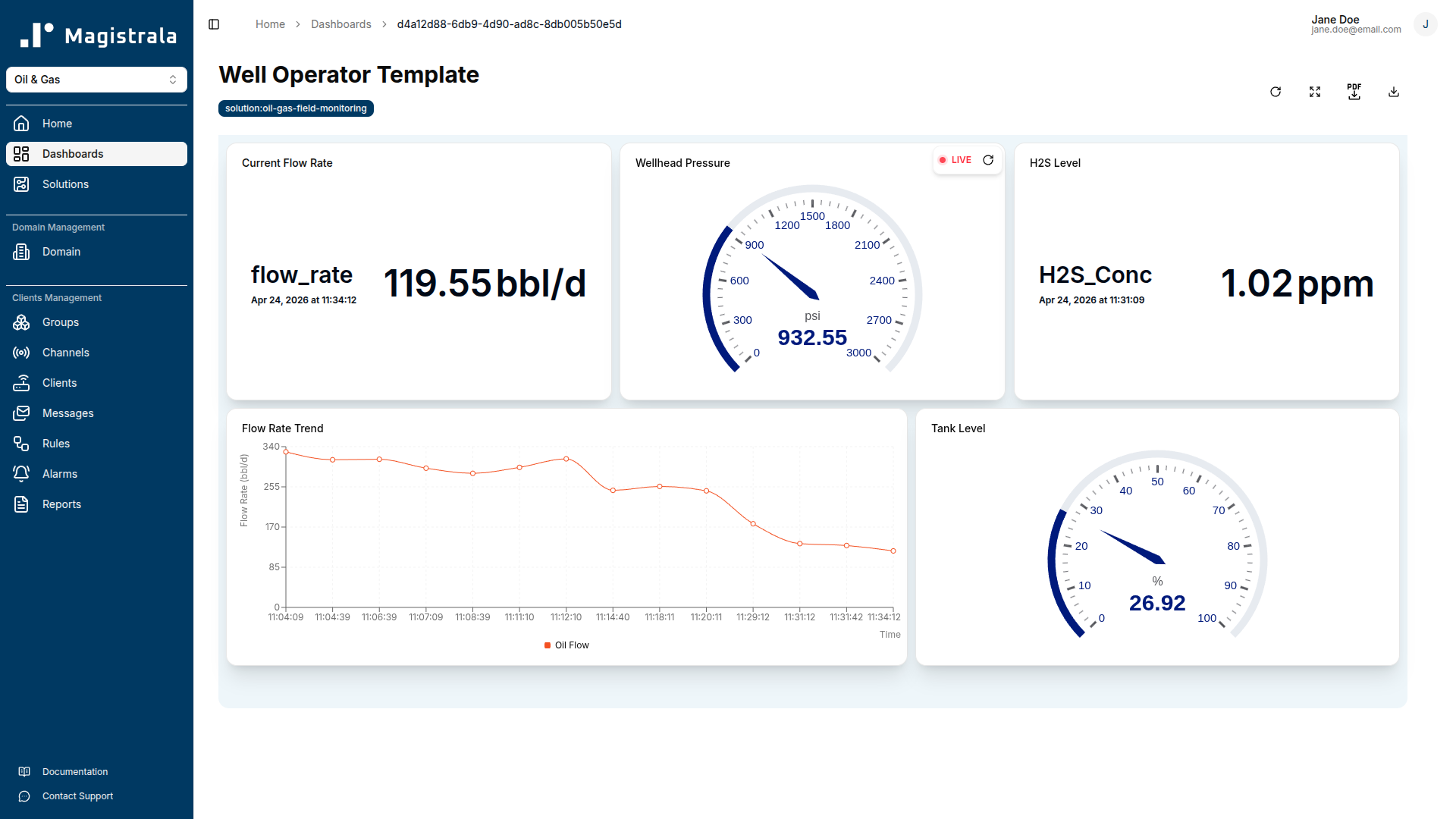
The Well Operator template is a tag-based view for individual well operators. It uses device:flow-meter, device:pressure-sensor, device:gas-detector, and device:tank-sensor tag references, so the same template applies to any wellhead when assigned to a group containing devices with those tags.
Five widgets: a live flow rate value card, a wellhead pressure gauge, an H2S level value card, a flow rate trend line chart (1-hour window), and a tank level gauge. Operators see only their assigned well's data.
Field Manager Summary Template
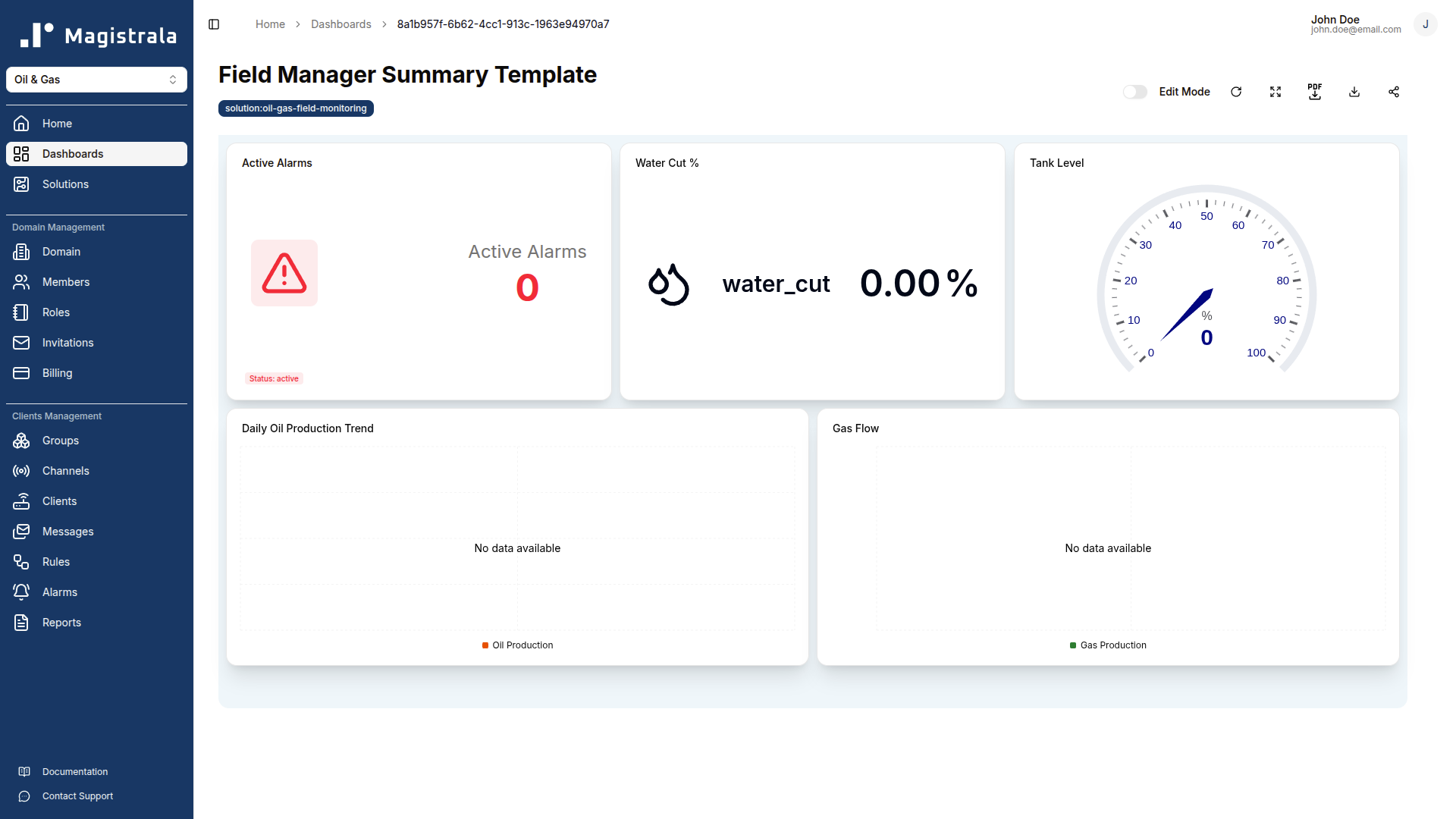
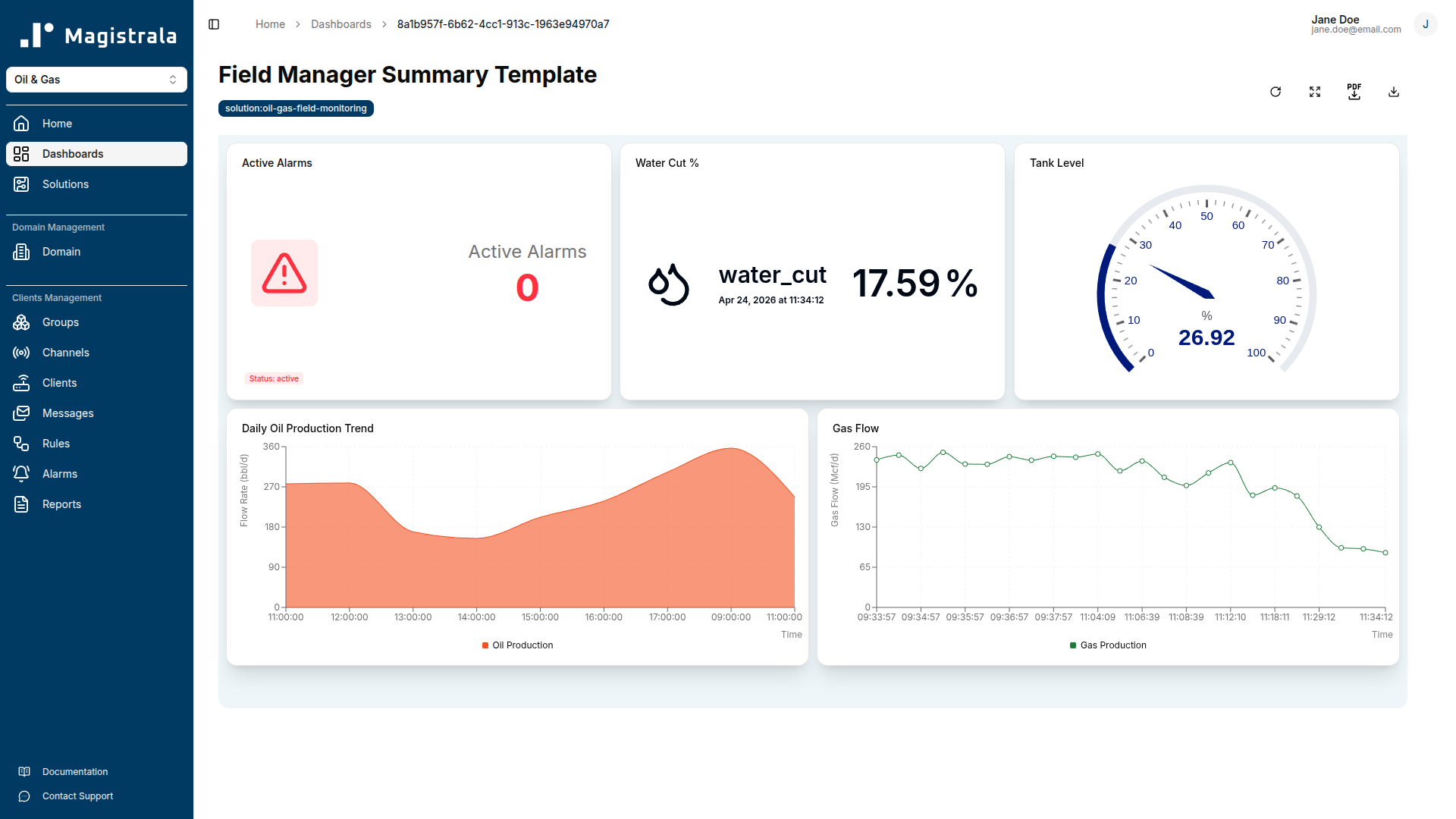
The Field Manager Summary template is a field-level view for managers overseeing multiple well sites. Uses tag-based references from device:flow-meter and device:tank-sensor tags.
Five widgets: a daily oil production area chart, an active alarm count card, a water cut value card, a tank level gauge, and a gas flow line chart.
Rules & Automation
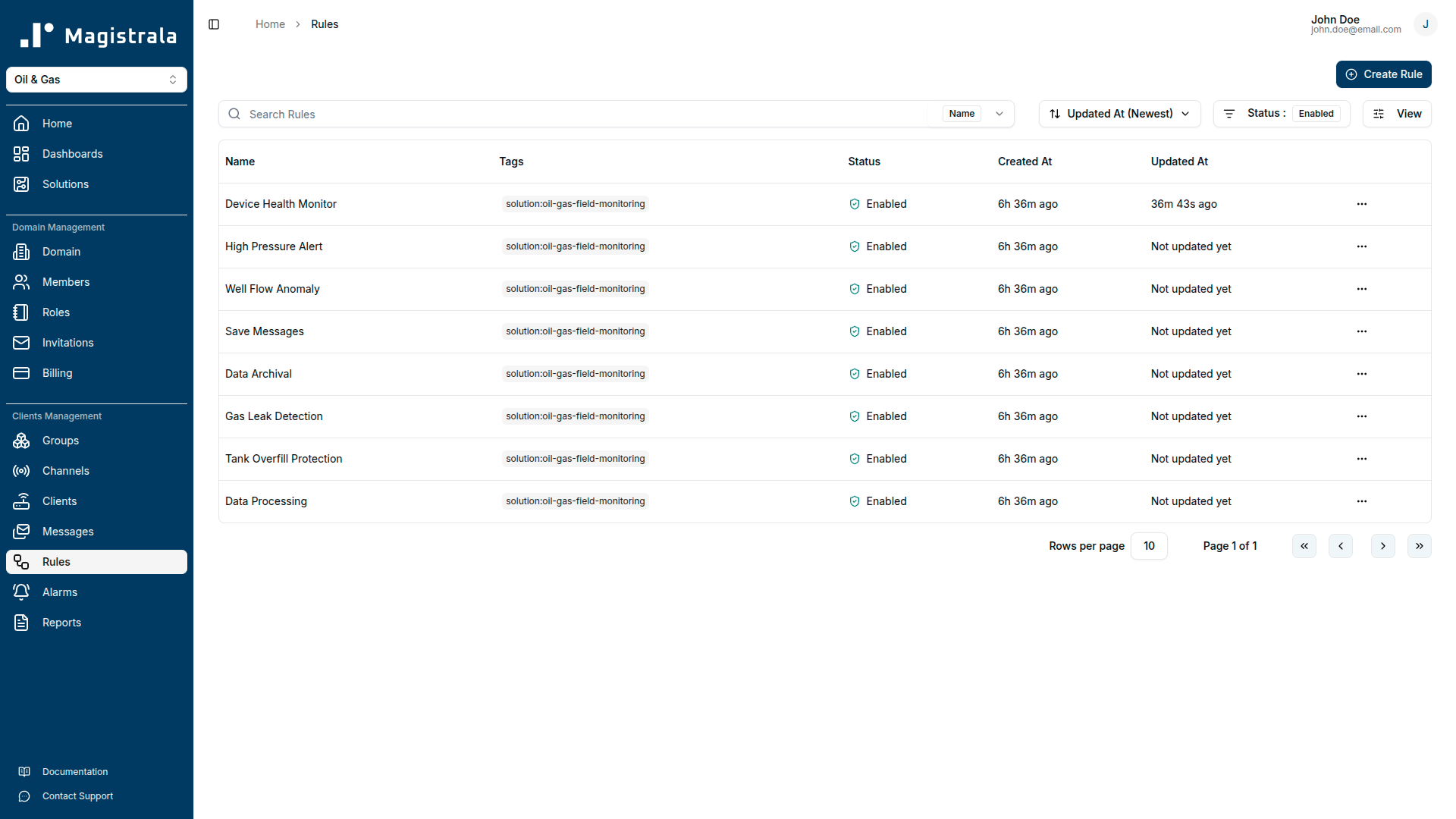
Save Messages
Passes all SenML records that contain a v field through to storage. Runs on the Raw Telemetry Channel and ensures raw data is always persisted regardless of what downstream processing rules do.
- Input: Raw Telemetry Channel
- Output: save_senml
Data Processing
Validates and range-checks incoming telemetry before forwarding clean data to the Processed Data Channel. Records that fail validation are discarded silently; they do not generate alarms and are not forwarded.
The rule discards records where:
flow_rateis outside 0-5000 bbl/dwellhead_pressureis outside 0-5000 psicasing_pressureis outside 0-5000 psih2s_concentrationis outside 0-100 ppmlel_percentis outside 0-100%tank_levelis outside 0-100%pump_statusis not 0 or 1
Valid records are forwarded to the Processed Data Channel and saved.
- Input: Raw Telemetry Channel
- Outputs: save_senml, channels → Processed Data Channel
High Pressure Alert
Monitors wellhead_pressure and casing_pressure in each incoming SenML message.
- Wellhead pressure warning (Severity 3):
wellhead_pressure≥ 1800 psi. Pressure approaching the operational warning threshold; inspect for downstream restrictions or valve issues before it escalates. - Wellhead pressure critical (Severity 5):
wellhead_pressure≥ 2200 psi. Blowout risk elevated; shut in the well if pressure cannot be reduced immediately. - Casing pressure warning (Severity 3):
casing_pressure≥ 1700 psi. Elevated annulus pressure may indicate tubing leak or gas migration.
Default thresholds match typical Permian Basin tight oil operating parameters. Adjust them in the rule configuration to match the MAOP for your specific well.
- Outputs: alarms, channels → Alerts Channel, email
Gas Leak Detection
Monitors h2s_concentration and lel_percent and enforces OSHA and industry-standard gas hazard thresholds.
-
H2S warning (Severity 3):
h2s_concentration≥ 5 ppm (ACGIH TLV-C). Ensure personnel have functional gas monitors and appropriate PPE. Investigate source and check ventilation. -
H2S critical (Severity 5):
h2s_concentration≥ 10 ppm (OSHA PEL ceiling). Evacuate non-essential personnel immediately and initiate emergency response. -
LEL warning (Severity 3):
lel_percent≥ 10%. Identify the source, improve ventilation, and restrict non-essential access. -
LEL critical (Severity 5):
lel_percent≥ 20%. Stop all ignition sources immediately and evacuate the area. -
Outputs: alarms, channels → Alerts Channel, email
Well Flow Anomaly
Monitors flow_rate, pump_status, and water_cut to detect production health problems.
-
Low flow warning (Severity 3):
flow_rate< 50 bbl/d ANDpump_status= 1. Abnormally low production while the pump is running; inspect the pump, flowline, and wellbore for restriction or decline. -
High water cut warning (Severity 3):
water_cut≥ 40%. Produced water fraction is elevated; monitor for continued increase and review water injection history. -
High water cut critical (Severity 5):
water_cut≥ 80%. Possible water breakthrough; well intervention or production adjustment required. -
Outputs: alarms, channels → Alerts Channel, email
Tank Overfill Protection
Monitors tank_level and fires alarms at two fill thresholds.
-
High level warning (Severity 3):
tank_level≥ 85%. Arrange oil transfer or schedule a trucking pickup within 4 hours to prevent an overfill event. -
Overfill critical (Severity 5):
tank_level≥ 95%. Stop production transfer to the tank immediately and arrange emergency trucking. -
Outputs: alarms, channels → Alerts Channel, email
Device Health Monitor
Runs hourly and compares the timestamp of each recent SenML record against the current server clock. Any device whose last message is more than 600 seconds (10 minutes) behind server time raises a Warning alarm (Severity 3).
For safety-critical devices (gas detector, pressure sensor), the alarm description recommends dispatching a field inspection immediately, since a connectivity failure removes the ability to detect hazardous conditions.
- Outputs: alarms, email
Data Archival
Runs against the Processed Data Channel and writes production and safety metrics to an external PostgreSQL database for long-term regulatory reporting and production accounting. Update the connection string in the rule configuration before enabling it.
- Output: save_remote_pg
Alarms Reference
| Alarm Name | Trigger Condition | Severity | Recommended Action |
|---|---|---|---|
| Wellhead Pressure: Warning | wellhead_pressure ≥ 1800 psi | Warning (3) | Inspect for downstream restrictions or valve issues |
| Wellhead Pressure: Critical | wellhead_pressure ≥ 2200 psi | Critical (5) | Shut in the well if pressure cannot be reduced immediately |
| Casing Pressure: Warning | casing_pressure ≥ 1700 psi | Warning (3) | Verify casing integrity and review well history |
| H2S Detected: Warning | h2s_concentration ≥ 5 ppm | Warning (3) | Confirm PPE, investigate source, check ventilation |
| H2S Detected: Critical | h2s_concentration ≥ 10 ppm | Critical (5) | Evacuate non-essential personnel, initiate emergency response |
| Flammable Gas: Warning | lel_percent ≥ 10% | Warning (3) | Identify source, improve ventilation, restrict non-essential access |
| Flammable Gas: Critical | lel_percent ≥ 20% | Critical (5) | Eliminate ignition sources, evacuate, initiate emergency procedures |
| Low Oil Flow | flow_rate < 50 bbl/d AND pump_status = 1 | Warning (3) | Inspect pump, flowline, and wellbore for restriction or decline |
| High Water Cut: Warning | water_cut ≥ 40% | Warning (3) | Monitor trend, review water injection history if applicable |
| High Water Cut: Critical | water_cut ≥ 80% | Critical (5) | Assess for water breakthrough, consider well intervention |
| Tank High Level | tank_level ≥ 85% | Warning (3) | Schedule trucking pickup within 4 hours |
| Tank Overfill Risk | tank_level ≥ 95% | Critical (5) | Stop production transfer, arrange emergency trucking immediately |
| Device Offline | No telemetry for > 600 s (evaluated hourly) | Warning (3) | Check device power, MQTT connectivity, and credentials |
Reports
Daily Production Report
Aggregates flow_rate (avg) at hourly intervals over a rolling 24-hour window. Delivers daily by email. Use this report to track daily oil production against targets and identify sustained declines before they trigger a production review.
Weekly Operations Report
Aggregates wellhead_pressure (avg), flow_rate (avg), water_cut (avg), tank_level (avg), and separator_temp (avg) at daily intervals over a 7-day rolling window. Delivers weekly. Use this report to track production performance trends and separator process conditions across the week.
Monthly Compliance Report
Aggregates production and safety metrics at daily intervals over a 30-day window. Delivers monthly. Provides the production and safety sensor history required for regulatory submission. Update the recipient addresses in the report configuration before the first scheduled run.
Payload Reference
| Field Name | Unit | Description | Example Value |
|---|---|---|---|
flow_rate | bbl/d | Crude oil volumetric flow rate at the wellhead. Sustained values below 50 bbl/d while the pump is running trigger the Low Oil Flow alarm. | 245.5 |
gas_flow | Mcf/d | Associated gas flow rate. Tracked for production accounting and gas-oil ratio monitoring. | 180.2 |
water_cut | % | Percentage of produced water in the total fluid stream. Warning at 40%, critical at 80%. | 12.5 |
wellhead_pressure | psi | Tubing head pressure at the wellhead. Warning at 1800 psi, critical at 2200 psi. | 1450.0 |
casing_pressure | psi | Annulus (casing-head) pressure. Warning at 1700 psi. | 1380.0 |
h2s_concentration | ppm | Hydrogen sulphide gas concentration. Warning at 5 ppm (ACGIH TLV-C), critical at 10 ppm (OSHA PEL). | 2.1 |
lel_percent | % | Flammable gas as a percentage of the Lower Explosive Limit. Warning at 10% LEL, critical at 20% LEL. | 3.5 |
tank_level | % | Crude oil storage tank fill level as a percentage of total capacity. Warning at 85%, critical at 95%. | 67.0 |
separator_temp | Cel | Operating temperature inside the three-phase separator. Tracked for process efficiency monitoring. | 85.0 |
separator_pressure | psi | Operating pressure inside the separator vessel. Monitored for separator upsets and downstream backpressure. | 125.0 |
pump_status | 1 | Transfer pump running state. 1 = running, 0 = stopped. Used with flow_rate to detect production anomalies. | 1 |
gateway_uptime | s | Wellhead gateway heartbeat timestamp. Used by the Device Health Monitor to verify gateway connectivity. | 1750000000 |
Troubleshooting
Messages are not appearing in the Raw Telemetry Channel.
Check that the MQTT client is using the correct topic: channels/<channel_id>/messages. The channel ID must be the Raw Telemetry Channel, not Processed Data, Alerts, or Commands. Verify the username is the client_id and the password is the client_secret. Use an MQTT debugging tool such as MQTT Explorer to confirm the connection is established before investigating the platform.
Messages arrive in Raw Telemetry but not in Processed Data Channel.
The Data Processing rule is discarding the records. Check each field value against the safe ranges in the Payload Reference table. Common causes: pump_status sent as a boolean (true/false) instead of an integer (1/0), wellhead_pressure sent in kPa instead of psi (values appear roughly 7 times too high), or h2s_concentration sent in mg/m³ instead of ppm.
High Pressure alarms fire at normal operating pressure.
Check the unit reported by the pressure transmitter. If it reports in kPa or bar, the value will exceed the 1800 psi warning threshold even at normal operating pressure. Either reconfigure the transmitter to report in psi, apply a unit conversion in the gateway before publishing, or adjust the rule thresholds to match the transmitter's native unit.
Gas Leak Detection alarms fire immediately after deployment.
The gas detector may need a warm-up period after power-on. Most electrochemical H2S sensors require 60-120 seconds to stabilise. Configure the device to delay publishing until it reports a stable reading, or build a startup grace period into the gateway logic.
Device Offline alarms fire for a device that is still connected.
The Device Health Monitor compares the SenML bt field against server time. If the device's clock has drifted or is not NTP-synchronised, records will appear stale. Configure the device to set bt to the current Unix epoch at publish time, or enable NTP synchronisation on the gateway.
The Well Operator or Field Manager template shows no data.
Tag-based templates require the assigned group to contain devices with the correct tags. Check that each device client has the expected tag: device:flow-meter, device:pressure-sensor, device:gas-detector, device:tank-sensor. Tags are case-sensitive. Navigate to the Clients section, open each device, and verify the tags match exactly.
Low Oil Flow alarms fire when production is normal.
The rule checks flow_rate < 50 bbl/d AND pump_status = 1. If the flow meter reports in a different unit (m³/d, L/s), the threshold comparison will be wrong. Ensure the meter reports in bbl/d, or adjust the rule threshold to the equivalent value in the meter's native unit.
Reports are not delivered by email.
Confirm SMTP credentials are configured in platform settings and that the sending domain is not blocked by the recipient's mail provider. Verify the recipient addresses in the report schedule configuration are correct and that the schedule window has elapsed at least once since configuration. Daily reports will not deliver until the configured daily window closes.
FAQ
How do we adjust pressure thresholds to match our well's MAOP?
Open the High Pressure Alert rule in the Rules page and edit the threshold constants. The defaults (1800 psi warning, 2200 psi critical for wellhead; 1700 psi for casing) are typical Permian Basin tight oil parameters. Replace them with the values from your well's specific Maximum Allowable Operating Pressure design specification. The change takes effect on the next incoming message, with no restart required.
Can the pack handle multiple wells or field sites?
Yes. Each field site is a Magistrala domain with its own device clients, channels, rules, and groups. The Well Operator and Field Manager Summary templates use tag-based device references, so deploying a new well means provisioning its clients and assigning a group, not duplicating template definitions. A central operations view can aggregate alarm counts across all sites while individual site data stays isolated.
How are H2S safety alarms escalated if no one acknowledges them?
The Gas Leak Detection rule sends email notifications to configured recipients the moment the alarm fires. For escalation chains, add multiple recipients in the rule's email output. For SMS or Safety Management System integration, use the rule's webhook output to POST the event to your external system. The alarm stays open in the platform until it is acknowledged or the H2S reading returns below threshold.
Do all sensors need to connect through the Wellhead Gateway, or can they connect directly?
Either approach works. Each device type has its own client credentials, so sensors with MQTT capability can connect directly. In most field deployments, all sensors route through the Wellhead Gateway: a single TLS connection handles the entire wellsite stream and the gateway can buffer readings during brief connectivity outages. Both approaches deliver identical telemetry to the Raw Telemetry Channel.
Smart Irrigation
The Smart Irrigation solution pack connects your soil moisture sensors, weather stations, flow meters, smart valves, tank level sensor, and pump controller to a single field management platform. Built for farms and managed landscapes that want real-time soil condition alerts, automated detection when pipes burst, remote valve and pump control from the dashboard, and weekly soil health and water usage reports, without custom integrations.
Introduction
Learn how to manage Domains in Magistrala — from creating roles and assigning users to Domains, to handling invitations, billing and subscription plans.