
Reports
Generate, schedule and export IoT data reports in Magistrala as PDF or CSV with timezone and email support.
The Reports Service in Magistrala provides a streamlined way to generate and schedule data reports from connected devices and sensors. It allows users to collect, aggregate, and export metrics in PDF and CSV formats, either via email or direct download.
Architecture
The Reports Service operates through three main components:
- Report Configurations: Define what data to collect and how to process it.
- Scheduler: Handles recurring report generation based on defined schedules.
- Generator Engine: Generates human-readable reports in various formats..

Note: All API operations require appropriate role-based permissions. Refer to the Roles Schema for details on available roles and the permissions they grant.
Reports Service Architecture
Core Concepts Report Configuration
type ReportConfig struct {
    ID          string
    Name        string
    Description string
    DomainID    string
    Config      *MetricConfig
    Metrics     []Metric
    Email       *EmailSetting        // Email Notification settings
    Schedule    Schedule      // Generation schedule
    ReportTemplate ReportTemplate    // Custom HTML template for PDF generation
    Status      Status        // Enabled/Disabled
    CreatedAt   time.Time
    CreatedBy   string
    UpdatedAt   time.Time
    UpdatedBy   string
}| Field | Type | Description | Required |
|---|---|---|---|
| ID | string | Auto-generated unique identifier | Auto |
| Name | string | Unique report name | ✅ |
| Description | string | Report description | Optional |
| DomainID | string | Domain context identifier | ✅ |
| Schedule | Schedule | Execution schedule configuration | ✅ |
| Config | MetricConfig | Data collection parameters | ✅ |
| EmailSetting | Email distribution settings | Optional | |
| Metrics | []Metric | List of metrics to include | ✅ |
| ReportTemplate | ReportTemplate | Custom HTML template for PDF generation | Optional |
| Status | Status | Enabled/Disabled state | ✅ |
| CreatedAt | time.Time | Creation timestamp | Auto |
| CreatedBy | string | Creator ID | Auto |
| UpdatedAt | time.Time | Last update timestamp | Auto |
| UpdatedBy | string | Last updater ID | Auto |
Metric Structure
type Metric struct {
    ChannelID  string  // Source channel for data
    ClientID   string  // Device/sensor identifier
    Name       string  // Metric name (e.g., "temperature", "current")
    Subtopic   string  // Data subtopic filter
    Protocol   string  // Protocol filter (MQTT, HTTP, etc.)
    Format     string
}| Field | Type | Description | Required |
|---|---|---|---|
| ChannelID | string | Source data channel ID | ✅ |
| ClientID | string | Specific device/sensor ID | Optional |
| Name | string | Metric name (e.g., "temperature") | ✅ |
| Subtopic | string | Data subtopic filter | Optional |
| Protocol | string | Protocol filter (MQTT/HTTP/etc.) | Optional |
| Format | string | Data format specification | Optional |
Report Parameters
type MetricConfig struct {
    From        string      // Relative start time (e.g., "now()-24h")
    To          string      // Relative end time (e.g., "now")
    FileFormat  Format      // Optional field
    Timezone    string      // Optional field (IANA timezone name, defaults to UTC)
    Aggregation AggConfig   // Data processing method
}

| Field         | Type      | Description                              | Required |
|---------------|-----------|------------------------------------------|----------|
| From          | string    | Start time (relative/absolute)           | ✅       |
| To            | string    | End time (relative/absolute)             | ✅       |
| FileFormat    | Format    | Output format (PDF/CSV)                  | Optional |
| Timezone      | string    | IANA timezone name ("Europe/Paris")      | Optional |
| Aggregation   | AggConfig | Data processing configuration            | Optional |


type AggConfig struct {
    AggType string  // "SUM", "AVG", "MIN", "MAX", "COUNT"
    Interval string
}| Field | Type | Description | Required |
|---|---|---|---|
| AggType | Aggregation | Processing type (MAX/MIN/SUM/AVG/COUNT) | If aggregation needed |
| Interval | string | Time window (e.g., "1h", "5m") | If AggType specified |
Example configurations
- Daily sales report at 8 AM: DAILY + 08:00.
- Weekly energy summary every Monday: WEEKLY + 00:00.
- Monthly inventory report: MONTHLY + 09:00.
Report Generation
Data Collection
- Connects to Magistrala's time-series database.
- Collects data using configured:
- Time range (From/To).
- Aggregation method.
- Metric filters.
- Supports complex queries across multiple devices and channels.
Timezone Support
The Reports Service supports timezone-aware report generation using IANA timezone names. This feature allows timestamps in generated reports to be displayed in the user's preferred timezone rather than UTC.
Key Features:
- Supports all IANA timezone names (e.g., "Europe/Paris", "America/New_York", "Asia/Tokyo")
- Defaults to UTC when no timezone is specified
- Automatically applies the timezone to:
- Report generation timestamps (header and footer)
- All message timestamps in both PDF and CSV formats
- Falls back to UTC gracefully if an invalid timezone is provided
Example Timezone Values:
"America/New_York"- Eastern Time (US)"Europe/London"- British Time"Asia/Tokyo"- Japan Standard Time"Australia/Sydney"- Australian Eastern Time""or omitted - Defaults to UTC
Note: The timezone field is optional and can be included in the config section of any report configuration or generation request.
Output Formats
Both PDF and CSV formats contain identical data - they differ only in presentation style and file structure:
| Feature | PDF Format | CSV Format |
|---|---|---|
| Structure | Multi-page document with tables | Single-file comma-separated values |
| Headers | Styled section headers | Simple text row headers |
| Data Format | Human-readable timestamps | Human-readable timestamps |
| Visual Elements | Page numbers, borders, shading | Plain text with commas |
| Best For | Printing/sharing | Programmatic analysis |
Example Data Representation
PDF Table:
| Time | Value | Unit | Protocol | Subtopic |
|---|---|---|---|---|
| 2024-03-15 09:30:00 | 23.4 | °C | http | room1 |
| 2024-03-15 09:35:00 | 45.2 | °C | http | room1 |
Equivalent CSV:
Timestamp,Value,Unit,Protocol,Subtopic
2024-03-15T09:30:00Z,23.4,°C,http,room1
2024-03-15T09:35:00Z,45.2,°C,http,room1
Email Integration
type EmailSetting struct {
    To      []string  // Recipient addresses
    Subject string    // Email subject line
}| Field | Type | Description | Required |
|---|---|---|---|
| To | []string | Recipient email addresses | ✅ |
| Subject | string | Email subject line | Optional |
| Content | string | Email body content | Optional |
NOTE: Automatically sends generated reports via email, including a summary of the report contents in the body.
Report Templates
The Reports Service supports custom HTML templates for PDF generation, allowing you to customize the appearance and layout of your reports. Templates use Go's standard html/template package and provide fine-grained control over report formatting.
Template Structure
type ReportTemplate string

func (temp ReportTemplate) Validate() error
func (temp ReportTemplate) String() string
func (temp ReportTemplate) MarshalJSON() ([]byte, error)
func (temp *ReportTemplate) UnmarshalJSON(data []byte) error
A template is a string containing HTML with embedded template variables and control structures. The template system validates all templates against required structure and fields before allowing their use.
Required Template Components
The template validation system uses a tiered approach to give users maximum control while ensuring PDF generation works correctly:
HTML Structure Requirements
| Element | Description | Required |
|---|---|---|
<!DOCTYPE html> | HTML5 document type declaration | ✅ |
<html> | Root HTML element | ✅ |
<head> | Document head section | ✅ |
<body> | Document body section | ✅ |
<style> | CSS styling section | ✅ |
Essential Template Variables (Required)
These fields are absolutely necessary for PDF generation:
| Variable | Description | Usage Example |
|---|---|---|
{{$.Title}} | Report title | <title>{{$.Title}}</title> |
{{range .Messages}}...{{end}} | Message iteration block | {{range .Messages}}<tr>...</tr>{{end}} |
{{formatTime .Time}} | Formatted timestamp | <td>{{formatTime .Time}}</td> |
{{formatValue .}} | Formatted message value | <td>{{formatValue .}}</td> |
Recommended Template Variables (Optional)
These fields enhance the report but are not strictly required:
| Variable | Description | Usage Example |
|---|---|---|
{{$.GeneratedDate}} | Generation date | <div>{{$.GeneratedDate}}</div> |
{{$.GeneratedTime}} | Generation time | <span>{{$.GeneratedTime}}</span> |
{{.Metric.Name}} | Metric name | <td>{{.Metric.Name}}</td> |
{{.Metric.ChannelID}} | Channel identifier | <td>{{.Metric.ChannelID}}</td> |
{{len .Messages}} | Message count | <span>{{len .Messages}}</span> |
Conditional Template Variables (Use if Needed)
These fields are only required if your data uses them:
| Variable | Description | When Required |
|---|---|---|
{{.Metric.ClientID}} | Device/client identifier | When filtering by specific devices |
{{.Unit}} | Value unit | When measurements have units |
{{.Protocol}} | Protocol type | When protocol filtering is used |
{{.Subtopic}} | Message subtopic | When subtopic filtering is used |
Essential CSS Classes (Required)
| CSS Class | Description | Purpose |
|---|---|---|
.page | Page container | Main page layout and styling |
.data-table | Data table styling | Table layout and formatting |
Recommended CSS Classes (Optional)
| CSS Class | Description | Purpose |
|---|---|---|
.header | Header section | Report header area |
.content-area | Main content area | Primary content container |
.metrics-section | Metrics information section | Metrics overview display |
.footer | Footer section | Report footer area |
Required Table Elements (Only if using .data-table)
| Element | Description | Purpose |
|---|---|---|
<table> | Table container | Main table structure |
<thead> | Table header section | Column headers |
<tbody> | Table body section | Data rows |
<th> | Table header cells | Column header definitions |
<td> | Table data cells | Individual data values |
Template Data Structure
Templates receive the following data structure:
type ReportData struct {
    Title         string    // Report title
    GeneratedTime string    // Generation time (HH:MM:SS format)
    GeneratedDate string    // Generation date (DD MMM YYYY format)
    Reports       []Report  // Array of report data
}

type Report struct {
    Metric   Metric          // Metric information
    Messages []senml.Message // Sensor data messages
}

type Metric struct {
    ChannelID string // Source channel ID
    ClientID  string // Device/sensor ID
    Name      string // Metric name
    Subtopic  string // Message subtopic
    Protocol  string // Protocol used
    Format    string // Data format
}
Template Functions
Templates have access to these custom functions:
| Function | Purpose | Usage |
|---|---|---|
formatTime | Format Unix timestamp | {{formatTime .Time}} |
formatValue | Format message value | {{formatValue .}} |
add | Add two integers | {{add $a $b}} |
sub | Subtract two integers | {{sub $a $b}} |
Template Management API
Create/Update Report Template
Update a custom template for a specific report configuration:
curl --location --request PUT 'http://localhost:9008/domains/{domainID}/reports/configs/{reportID}/template' \
--header 'Content-Type: application/json' \
--header 'Authorization: Bearer $ACCESSTOKEN' \
--data '{
    "report_template": "<!DOCTYPE html><html><head><style>.page{...}.header{...}</style></head><body>{{range .Reports}}<div class=\"page\">...</div>{{end}}</body></html>"
}'
View Report Template
Retrieve the current template for a report configuration:
curl --location 'http://localhost:9008/domains/{domainID}/reports/configs/{reportID}/template' \
--header 'Authorization: Bearer $ACCESSTOKEN'
Response:
{
    "template": "<!DOCTYPE html><html>..."
}
Delete Report Template
Remove a custom template (reverts to default):
curl --location --request DELETE 'http://localhost:9008/domains/{domainID}/reports/configs/{reportID}/template' \
--header 'Authorization: Bearer $ACCESSTOKEN'
Template Usage in Reports
Templates can be used in two ways:
- Configuration-level Template: Set a custom template for a specific report configuration.
- Request-level Template: Include a template in individual report generation requests.
Configuration-level Usage
curl --location 'http://localhost:9008/domains/{domainID}/reports/configs' \
--header 'Content-Type: application/json' \
--header 'Authorization: Bearer $ACCESSTOKEN' \
--data '{
    "name": "Custom Template Report",
    "description": "Report with custom template",
    "config": {
        "from": "now()-24h",
        "to": "now()",
        "title": "Daily Temperature Report"
    },
    "metrics": [...],
    "report_template": "<!DOCTYPE html>..."
}'
Request-level Usage
curl --location 'http://localhost:9008/domains/{domainID}/reports?action=download' \
--header 'Content-Type: application/json' \
--header 'Authorization: Bearer $ACCESSTOKEN' \
--data '{
    "name": "Temp Report",
    "config": {
        "from": "now()-24h",
        "to": "now()",
        "file_format": "pdf",
        "title": "Temperature Analysis"
    },
    "metrics": [...],
    "report_template": "<!DOCTYPE html>..."
}'
Template Example
Here's a complete working template that demonstrates all required elements:
<!DOCTYPE html>
<html lang="en">
<head>
    <meta charset="UTF-8">
    <meta name="viewport" content="width=device-width,initial-scale=1.0">
    <title>{{$.Title}}</title>
    <style>
        /* CSS Variables for consistent theming */
        :root {
            --primary-color: #0066cc;
            --secondary-color: #004499;
            --accent-color: #ff6b35;
            /* ... additional CSS variables ... */
        }

        /* Required CSS Classes */
        .page {
            max-width: 210mm;
            min-height: 297mm;
            background: var(--white);
            display: flex;
            flex-direction: column;
            /* ... additional styling ... */
        }

        .header {
            height: var(--header-height);
            position: relative;
            flex-shrink: 0;
            /* ... header styling ... */
        }

        .content-area {
            flex-grow: 1;
            display: flex;
            flex-direction: column;
            /* ... content styling ... */
        }

        .metrics-section {
            margin-bottom: 20px;
            /* ... metrics styling ... */
        }

        .data-table {
            width: 100%;
            border-collapse: collapse;
            /* ... table styling ... */
        }

        .footer {
            height: var(--footer-height);
            border-top: 3px solid var(--subtle-color);
            /* ... footer styling ... */
        }
    </style>
</head>
<body>
    {{$totalPages := len .Reports}}
    {{$globalPage := 0}}
    {{range $index, $report := .Reports}}
    {{$globalPage = add $globalPage 1}}

    <div class="page">
        <div class="header">
            <div class="header-content">
                <div class="header-logo">MAGISTRALA</div>
                <div class="header-title">{{$.Title}}</div>
                <div class="header-date">{{$.GeneratedDate}}</div>
            </div>
        </div>

        <div class="content-area">
            <div class="metrics-section">
                <div class="metrics-info">
                    <div class="metric-row">
                        <div class="metric-label">Name:</div>
                        <div class="metric-value">{{.Metric.Name}}</div>
                    </div>
                    {{if .Metric.ClientID}}
                    <div class="metric-row">
                        <div class="metric-label">Device ID:</div>
                        <div class="metric-value">{{.Metric.ClientID}}</div>
                    </div>
                    {{end}}
                    <div class="metric-row">
                        <div class="metric-label">Channel ID:</div>
                        <div class="metric-value">{{.Metric.ChannelID}}</div>
                    </div>
                </div>
            </div>

            <div class="record-count">
                Total Records: {{len .Messages}}
            </div>

            <div class="table-container">
                <table class="data-table">
                    <thead>
                        <tr>
                            <th class="col-time">Time</th>
                            <th class="col-value">Value</th>
                            <th class="col-unit">Unit</th>
                            <th class="col-protocol">Protocol</th>
                            <th class="col-subtopic">Subtopic</th>
                        </tr>
                    </thead>
                    <tbody>
                        {{range .Messages}}
                        <tr>
                            <td class="col-time">{{formatTime .Time}}</td>
                            <td class="col-value">{{formatValue .}}</td>
                            <td class="col-unit">{{.Unit}}</td>
                            <td class="col-protocol">{{.Protocol}}</td>
                            <td class="col-subtopic">{{.Subtopic}}</td>
                        </tr>
                        {{end}}
                    </tbody>
                </table>
            </div>
        </div>

        <div class="footer">
            <div class="footer-content">
                <div class="footer-generated">Generated: {{$.GeneratedTime}}</div>
                <div class="footer-page">Page {{$globalPage}} of {{$totalPages}}</div>
            </div>
        </div>
    </div>
    {{end}}
</body>
</html>
Minimal Template Example
For users who want maximum control and minimal requirements, here's the absolute minimal template:
<!DOCTYPE html>
<html>
<head>
    <title>{{$.Title}}</title>
    <style>
        .page {
            padding: 20px;
            font-family: Arial, sans-serif;
        }
        .data-table {
            width: 100%;
            border-collapse: collapse;
            border: 1px solid #ccc;
        }
        .data-table th, .data-table td {
            border: 1px solid #ccc;
            padding: 8px;
            text-align: left;
        }
        .data-table th {
            background-color: #f5f5f5;
        }
    </style>
</head>
<body>
    {{range .Reports}}
    <div class="page">
        <h1>{{$.Title}}</h1>

        <table class="data-table">
            <thead>
                <tr>
                    <th>Time</th>
                    <th>Value</th>
                </tr>
            </thead>
            <tbody>
                {{range .Messages}}
                <tr>
                    <td>{{formatTime .Time}}</td>
                    <td>{{formatValue .}}</td>
                </tr>
                {{end}}
            </tbody>
        </table>
    </div>
    {{end}}
</body>
</html>
This minimal template includes only:
- ✅ HTML structure (
<!DOCTYPE html>,<html>,<head>,<body>,<style>). - ✅ Essential variables (
{{$.Title}},{{range .Messages}},{{formatTime .Time}},{{formatValue .}},{{end}}). - ✅ Essential CSS classes (
.page,.data-table). - ✅ Basic table structure (
<table>,<thead>,<tbody>,<th>,<td>).
Template Breakdown
This example demonstrates how all required elements work together:
1. HTML Structure Requirements ✅
<!DOCTYPE html>        <!-- Required DOCTYPE -->
<html lang="en">       <!-- Required html tag -->
<head>                 <!-- Required head section -->
<style>                <!-- Required style section -->
<body>                 <!-- Required body tag -->
2. Required Template Variables ✅
{{$.Title}}- Used in<title>and header section.{{$.GeneratedDate}}- Displayed in header date area.{{$.GeneratedTime}}- Shown in footer.{{.Metric.Name}}- Metric name in info section.{{.Metric.ClientID}}- Device ID (with conditional display).{{.Metric.ChannelID}}- Channel ID in info section.{{len .Messages}}- Record count display.{{range .Messages}}...{{end}}- Iterates through data.{{formatTime .Time}}- Formats timestamps.{{formatValue .}}- Formats values.{{.Unit}},{{.Protocol}},{{.Subtopic}}- Data fields.
3. Required CSS Classes ✅
.page- Main page container with layout properties..header- Header section styling..content-area- Main content area with flex layout..metrics-section- Metrics information styling..data-table- Table styling and layout..footer- Footer section positioning.
4. Required Table Elements ✅
<table class="data-table">    <!-- Table container -->
  <thead>                     <!-- Table header -->
    <tr>
      <th>Time</th>           <!-- Required headers -->
      <th>Value</th>
      <th>Unit</th>
      <th>Protocol</th>
      <th>Subtopic</th>
    </tr>
  </thead>
  <tbody>                     <!-- Table body -->
    <tr>
      <td>{{formatTime .Time}}</td>  <!-- Data cells -->
      <td>{{formatValue .}}</td>
      <!-- ... more cells ... -->
    </tr>
  </tbody>
</table>
5. Template Functions Usage ✅
{{add $globalPage 1}}- Increment page counter.{{formatTime .Time}}- Format Unix timestamps.{{formatValue .}}- Format message values.{{len .Messages}}- Count messages.
6. Template Control Structures ✅
{{range $index, $report := .Reports}}    <!-- Loop through reports -->
  {{$globalPage = add $globalPage 1}}    <!-- Variable assignment -->

  {{if .Metric.ClientID}}               <!-- Conditional display -->
    <div>{{.Metric.ClientID}}</div>
  {{end}}

  {{range .Messages}}                   <!-- Nested loop for messages -->
    <tr>...</tr>
  {{end}}
{{end}}                                 <!-- Properly closed blocks -->
Advanced Features Demonstrated
- CSS Custom Properties: Using CSS variables for consistent theming.
- Responsive Design: Viewport meta tag and flexible layouts.
- Print Optimization:
@media printstyles for PDF generation. - Visual Enhancements: Gradients, shadows, and modern styling.
- Conditional Content: Using
{{if}}to show optional fields. - Page Counting: Variable manipulation for page numbers.
Template Validation
The system performs comprehensive validation on report templates to ensure they can generate valid PDF reports. The validation process uses Go's template parser to check both syntax and required fields.
Template Validation Process
When a template is provided (either during report config creation, template update, or report generation), the system validates:
- Template Syntax: Uses Go's
text/templateparser to verify the template has valid Go template syntax - Essential Fields: Ensures all required template variables and control structures are present
- Template Structure: Validates that template blocks are properly opened and closed
Required Template Elements
The following elements are mandatory for template validation to pass:
1. Essential Template Variables
{{$.Title}}- Report title (must be present somewhere in the template){{range .Messages}}- Loop structure to iterate through message data{{formatTime .Time}}- Function to format message timestamps{{formatValue .}}- Function to format message values{{end}}- Closing tag for the range block
2. Template Control Structures
- All
{{range}}blocks must have corresponding{{end}}tags - All
{{if}}blocks must have corresponding{{end}}tags - All
{{with}}blocks must have corresponding{{end}}tags
Common Validation Errors
| Error Type | Description | Example | Solution |
|---|---|---|---|
| Template syntax error | Invalid Go template syntax | {{range .Messages"}} (missing closing }}) | Fix template syntax: {{range .Messages}} |
| Missing essential field: $.Title | Template lacks title variable | Template without {{$.Title}} | Add {{$.Title}} somewhere in template |
| Missing essential field: range .Messages | Template lacks message iteration | No {{range .Messages}} block | Add {{range .Messages}}...{{end}} block |
| Missing essential field: formatTime .Time | Template lacks time formatting | No {{formatTime .Time}} in range block | Add {{formatTime .Time}} inside messages range |
| Missing essential field: formatValue . | Template lacks value formatting | No {{formatValue .}} in range block | Add {{formatValue .}} inside messages range |
| Missing essential field: end | Template lacks proper block closure | {{range .Messages}} without {{end}} | Ensure all blocks are properly closed |
Validation Examples
✅ Valid minimal template:
<!DOCTYPE html>
<html>
<head><title>{{$.Title}}</title></head>
<body>
  <h1>{{$.Title}}</h1>
  {{range .Messages}}
    <p>Time: {{formatTime .Time}}, Value: {{formatValue .}}</p>
  {{end}}
</body>
</html>
❌ Invalid template (missing formatTime):
<!DOCTYPE html>
<html>
<head><title>{{$.Title}}</title></head>
<body>
  <h1>{{$.Title}}</h1>
  {{range .Messages}}
    <p>Value: {{formatValue .}}</p>  <!-- Missing formatTime .Time -->
  {{end}}
</body>
</html>
❌ Invalid template (syntax error):
<!DOCTYPE html>
<html>
<head><title>{{$.Title}}</title></head>
<body>
  <h1>{{$.Title}}</h1>
  {{range .Messages}}
    <p>Time: {{formatTime .Time}}, Value: {{formatValue .}}</p>
  {{end  <!-- Missing closing }} -->
</body>
</html>
When Validation Occurs
Template validation is performed during:
- Report Config Creation (
POST /configs) - Ifreport_templatefield is provided - Template Update (
PUT /configs/{reportID}/template) - Always validates the new template - Report Generation (
POST /) - Ifreport_templatefield is provided in the request
If validation fails, the API returns HTTP 400 with a descriptive error message indicating what's missing or incorrect.
Optional vs Required Elements
The validation focuses only on elements absolutely necessary for report generation. The following are optional and not validated:
- HTML structure (DOCTYPE, html, head, body tags)
- CSS styling and classes
- Additional template variables like
{{$.GeneratedDate}},{{.Metric.Name}}, etc. - Table structures and formatting
- Custom functions beyond
formatTimeandformatValue
This approach gives developers maximum flexibility while ensuring the core functionality works correctly.
Default Template
If no custom template is provided, the system uses a built-in default template that includes:
- Professional styling with corporate color scheme.
- Responsive layout optimized for PDF generation.
- Automatic page breaks for multi-metric reports.
- Header and footer sections with metadata.
- Sortable data tables with alternating row colors.
Best Practices
- Start with the default template as a reference for required structure.
- Test template validation before using in production.
- Use semantic CSS classes for maintainable styling.
- Consider PDF constraints when designing layouts.
- Include proper error handling for missing data fields.
- Validate template blocks are properly closed.
API Operations
Base URL: http://localhost:9008/{domainID}/reports
- Create Report Configuration
Endpoint: POST /configs
curl --location http://localhost:9008/domains/{domainID}/reports/configs \
--header 'Content-Type: application/json' \
--header 'Authorization: Bearer $ACCESSTOKEN' \
--data '{
    "name": "lab 1 report",
    "description": "lab 1 sensors report",
    "config": {
        "from": "now()-5d",
        "to": "now()",
        "timezone": "America/New_York",
        "aggregation": {
            "agg_type":"MAX",
            "interval":"1s"
        }
    },
    "metrics": [
        {
            "channel_id": "{{CHANNELID}}",
            "client_id": "{{THINGID}}",
            "name": "current",
            "subtopic": "lab/room1"
        }
    ]
    "schedule": {
        "start_datetime": "2025-04-28T00:00:00.000Z",
        "time": "0001-01-01T20:30:00.000Z",
        "recurring": "daily",
        "recurring_period": 1
    },
    "email": {
        "to": ["team@example.com"],
        "subject": "Weekly Lab Report"
    },
    "report_template": "<!DOCTYPE html><html>...</html>"
}'Note: The
report_templatefield is optional. If provided, it must contain valid HTML with all required template elements. If omitted, the default template will be used.
Expected response:
{
    "id": "daebc977-60a6-49f9-8f9f-200474a8c697",
    "name": "lab report",
    "description": "lab 1 report",
    "domain_id": "88c2bc9a-ce3b-4dfc-804d-219177cb9a75",
    "schedule": {
        "start_datetime": "2025-04-28T00:00:00Z",
        "time": "0001-01-01T20:30:00Z",
        "recurring": "daily",
        "recurring_period": 1
    },
    "config": {
        "from": "now()-5d",
        "to": "now()",
        "timezone": "America/New_York",
        "aggregation": {
            "agg_type": "max",
            "interval": "1s"
        }
    },
    "email": {
        "to": [
            "team@example.com"
        ],
        "subject": "Weekly Lab Report"
    },
    "metrics": [
        {
            "channel_id": "f0e052ce-ef01-49b9-862c-2ecbc911f0a1",
            "client_id": "69a9b488-523a-4805-aae9-123febaf83f5",
            "name": "current",
            "format": ""
        }
    ],
    "status": "enabled",
    "created_at": "2025-04-28T12:59:13.768526Z",
    "created_by": "14c2a388-310d-402b-ad8e-8c0b7d9f81f1",
    "updated_at": "0001-01-01T00:00:00Z"
}- Generate Report
Endpoint:
POST /
curl -X POST http://localhost:9008/domains/{domainID}/reports \
--header 'Content-Type: application/json' \
--header 'Authorization: Bearer $ACCESSTOKEN' \
--data '{
    "name": "lab 1 report",
    "description": "lab 1 sensors report",
    "config": {
        "from": "now()-5d",
        "to": "now()",
        "timezone": "Europe/London",
        "aggregation": {
            "agg_type":"MAX",
            "interval":"1s"
        }
    },
    "metrics": [
        {
            "channel_id": "{{CHANNELID}}",
            "client_id": "{{THINGID}}",
            "name": "current"
            "subtopic": "lab/room1"
        }
    ]
}'
Expected response:
{
    "total": 1,
    "from": "2025-04-23T08:57:29.23737193Z",
    "to": "2025-04-28T08:57:29.237409661Z",
    "aggregation": {},
    "reports": [
        {
            "metric": {
                "channel_id": "a246bea7-dc05-49f1-bb61-c08c44a7df33",
                "client_id": "e2ab8673-8599-435f-8d42-62903d279492",
                "name": "current",
                "format": ""
            },
            "messages": [
                {
                    "subtopic": "lab/room1",
                    "protocol": "http",
                    "name": "current",
                    "unit": "A",
                    "time": 1276020072001000000,
                    "value": 1.33
                },
                {
                    "subtopic": "lab/room1",
                    "protocol": "http",
                    "name": "current",
                    "unit": "A",
                    "time": 1276020071001000000,
                    "value": 1.5
                }
            ]
        }
    ]
}Note: This API can be used to configure multiple actions and download reports. The available actions are
view,downloadandview. To change the action you can pass the action parameter:
curl --location 'http://localhost:9008/bd1bb2c5-ce78-4456-8725-bd1beab80250/reports?action=download' \
--header 'Content-Type: application/json' \
--header 'Authorization: Bearer $ACCESSTOKEN' \
--data '{
    "name": "lab 1 report",
    "description": "lab 1 sensors report",
    "config": {
        "from": "now()-5d",
        "to": "now()",
        "file_format": "pdf",
        "timezone": "Asia/Tokyo"
    },
    "metrics": [
        {
            "channel_id": "a246bea7-dc05-49f1-bb61-c08c44a7df33",
            "client_id": "e2ab8673-8599-435f-8d42-62903d279492",
            "name": "current"
        }
    ]
}'
Expected response:
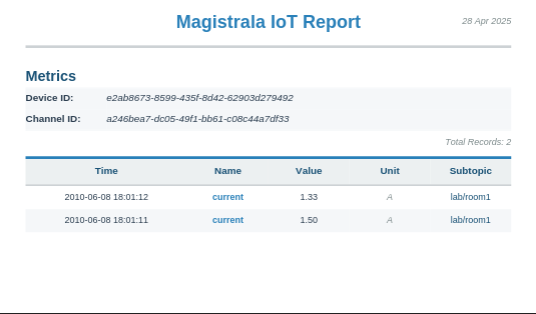
Note: The supported formats are
csvand
To send the generated report via email it can be done as follows:
curl --location 'http://localhost:9008/bd1bb2c5-ce78-4456-8725-bd1beab80250/reports?action=email' \
--header 'Content-Type: application/json' \
--header 'Authorization: Bearer $ACCESSTOKEN' \
--data-raw '{
    "name": "lab 1 report",
    "description": "lab 1 sensors report",
    "config": {
        "from": "now()-5d",
        "to": "now()",
        "file_format": "pdf",
        "timezone": "Australia/Sydney"
    },
    "metrics": [
        {
            "channel_id": "a246bea7-dc05-49f1-bb61-c08c44a7df33",
            "client_id": "e2ab8673-8599-435f-8d42-62903d279492",
            "name": "current"
        }
    ],
     "email":{
        "to": ["team@example.com"],
        "subject": "Weekly Lab Report"
    }
}'- List Report Configurations
Endpoint:
GET /configs
curl "http://localhost:9008/domains/{domainID}/reports/configs?status=enabled&limit=10" \
--header 'Authorization: Bearer $ACCESSTOKEN'
Expected response:
{
    "limit": 10,
    "offset": 0,
    "total": 1,
    "report_configs": [
        {
            "id": "daebc977-60a6-49f9-8f9f-200474a8c697",
            "name": "lab report",
            "description": "lab 1 report",
            "domain_id": "88c2bc9a-ce3b-4dfc-804d-219177cb9a75",
            "schedule": {
                "start_datetime": "2025-04-28T00:00:00Z",
                "time": "0001-01-01T20:30:00Z",
                "recurring": "daily",
                "recurring_period": 1
            },
            "config": {
                "from": "now()-5d",
                "to": "now()",
                "aggregation": {
                    "agg_type": "max",
                    "interval": "1s"
                }
            },
            "email": {
                "to": [
                    "team@example.com"
                ],
                "subject": "Weekly Lab Report"
            },
            "metrics": [
                {
                    "channel_id": "f0e052ce-ef01-49b9-862c-2ecbc911f0a1",
                    "client_id": "69a9b488-523a-4805-aae9-123febaf83f5",
                    "name": "current",
                    "format": ""
                }
            ],
            "status": "enabled",
            "created_at": "2025-04-28T12:59:13.768526Z",
            "created_by": "14c2a388-310d-402b-ad8e-8c0b7d9f81f1",
            "updated_at": "0001-01-01T00:00:00Z"
        }
    ]
}
Note : The following parameters are supported
status,limit,offsetandname. This allows for search byname
- View report configurations
Endpoint:
GET /configs/{reportID}
curl --location 'http://localhost:9008/{domainID}/reports/configs/{reportID}' \
--header 'Authorization: Bearer $TOKEN'- Enable Report Configuration Activate a scheduled report configuration.
Endpoint:
POST /{domainID}/reports/configs/{reportID}/enable
curl --location http://localhost:9008/domains/{domainID}/reports/configs/{reportID}/enable \
--header 'Authorization: Bearer $ACCESSTOKEN'- Disable Report Configuration Pause a scheduled report generation.
Endpoint:
POST /{domainID}/reports/configs/{reportID}/disable
curl --location http://localhost:9008/domains/{domainID}/reports/configs/{reportID}/disable \
--header 'Authorization: Bearer $ACCESSTOKEN'- Update Report Configuration Modify an existing report configuration.
Endpoint:
PATCH /{domainID}/reports/configs/{reportID}
curl --location --request PATCH 'http://localhost:9008/domains/{domainID}/reports/configs/{reportID}' \
--header 'Content-Type: application/json' \
--header 'Authorization: Bearer $ACCESSTOKEN' \
--data '{
    "name": "Updated Environment Report",
    "schedule": {
        "start_datetime": "2025-04-07T00:00:00.000Z",
        "time": "0001-01-01T00:00:00.000Z",
        "recurring": "daily",
        "recurring_period": 1
    }
}'- Update Report Template Update the custom HTML template for a report configuration.
Endpoint:
PUT /{domainID}/reports/configs/{reportID}/template
curl --location --request PUT 'http://localhost:9008/domains/{domainID}/reports/configs/{reportID}/template' \
--header 'Content-Type: application/json' \
--header 'Authorization: Bearer $ACCESSTOKEN' \
--data '{
    "report_template": "<!DOCTYPE html><html><head><style>...</style></head><body>...</body></html>"
}'- View Report Template Retrieve the current template for a report configuration.
Endpoint:
GET /{domainID}/reports/configs/{reportID}/template
curl --location 'http://localhost:9008/domains/{domainID}/reports/configs/{reportID}/template' \
--header 'Authorization: Bearer $ACCESSTOKEN'- Delete Report Template Remove a custom template (reverts to default template).
Endpoint:
DELETE /{domainID}/reports/configs/{reportID}/template
curl --location --request DELETE 'http://localhost:9008/domains/{domainID}/reports/configs/{reportID}/template' \
--header 'Authorization: Bearer $ACCESSTOKEN'